How to Export a Single ChatGPT Conversation
Short answer
Yes. You can save one specific ChatGPT conversation separately without downloading your full account history. Use a shared link to let someone view it, PDF for a readable snapshot, copy-paste for a short chat, or local TXT export when you want a private file you can search and reuse.
OpenAI’s Data Export is different: it is an account-level export request that can include broader account data, not a quick download of one current chat.
| Method | Best use | Local reusable file? |
|---|---|---|
| Shared Link | Let someone view one conversation | No |
| Keep a readable snapshot | Yes | |
| Copy-paste | Save a short chat manually | Yes |
| Local TXT Export | Search and reuse one active chat | Yes |
| Full Data Export | Back up account-level data | Yes, but it includes broader data |
How to export one ChatGPT chat
- Open the conversation you want to keep.
- Choose the format: Shared Link for access, PDF for a static document, or TXT for searchable reuse.
- For local TXT/Q&A notes, open ChatGPT Session Saver while the chat is active and export the conversation.
- Check that the opening prompt and final answer are included, then store the file with a clear name.
Save one chat as local notes: Try ChatGPT Session Saver.
If the active conversation is a Temporary Chat, save or export it before leaving: How to Save or Export a Temporary Chat in ChatGPT.
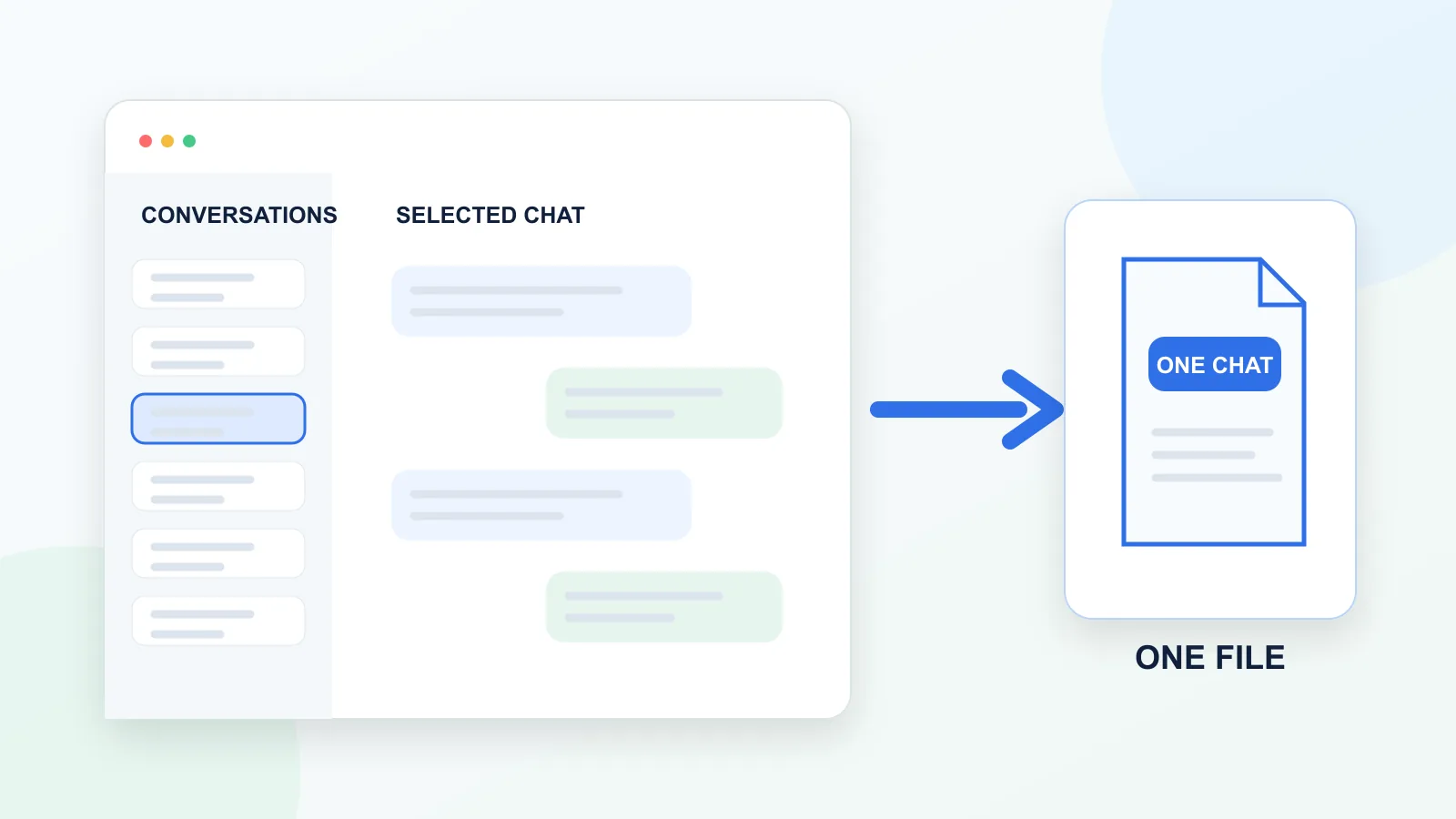
One chat vs full account export
Single-chat export saves one specific conversation. Full account export downloads broader account-level data. A shared link shows a conversation to someone else, but it is not the same as owning a local file.
What “single ChatGPT conversation export” means
A single ChatGPT conversation export means saving one specific chat thread outside the ChatGPT interface.
This is different from exporting your full ChatGPT account history.
A single conversation export is useful when you have one important chat that you want to:
- save as a file;
- search later;
- turn into notes;
- share with someone;
- reuse in a document;
- move into a personal knowledge base;
- archive locally.
For example, you may want to save one conversation about a writing project, research task, coding problem, travel plan, business idea, or study topic. Writers can use this workflow to archive a brainstorming session with drafts, rewrites, and final copy. Developers can use it to preserve a debugging conversation from the original error through the verified fix.
The key point is simple: you do not always need your entire ChatGPT history. Sometimes you only need one useful conversation.
Many people search for “ChatGPT export” and expect a simple “download this chat” button. The practical distinction is:
| Export type | What it means | Best for |
|---|---|---|
| Full account export | Downloading account-level ChatGPT data | Backup and account records |
| Single conversation export | Saving one specific active chat | Notes, reuse, sharing, or local archive |
Official ChatGPT data export is useful, but it is not always the best tool for saving one specific conversation quickly.
If your goal is to keep a full backup of your account, official data export makes sense. If your goal is to save one active conversation in a clean format, use a different workflow. For the full comparison, read ChatGPT Data Export vs Single-Chat Export.
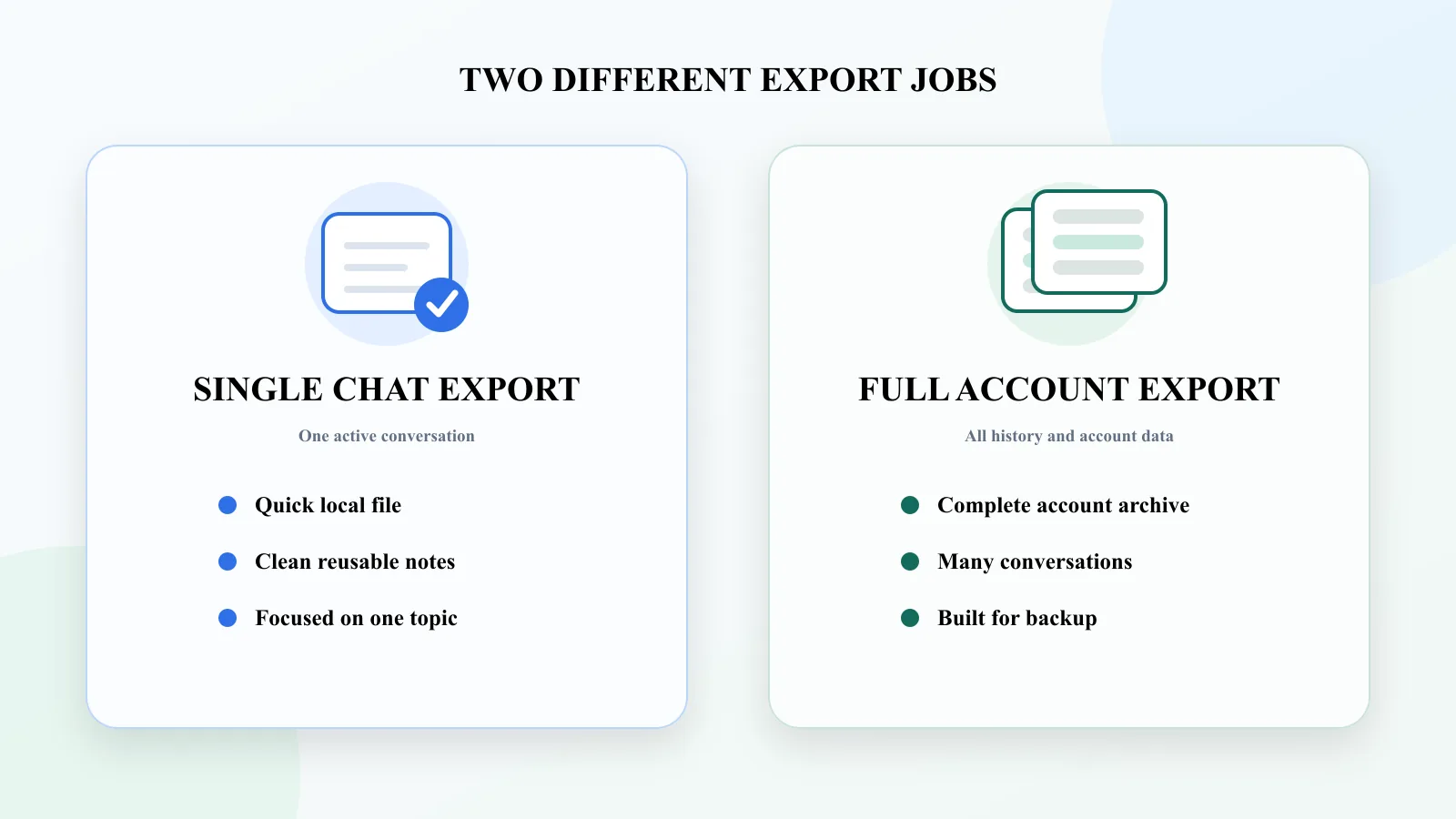
For the full decision tree, see the pillar guide to export long ChatGPT chats.
Single-chat export vs. shared link
| Feature | Single-chat local export | Shared link |
|---|---|---|
| Creates a local file | Yes | No |
| Good for sharing | Not primarily | Yes |
| Good for private archive | Yes | Limited |
| Easy to edit | Yes, if TXT/Markdown | No |
| Depends on a link | No | Yes |
| Best use case | Saving and reuse | Showing someone the conversation |
A shared link is useful when another person needs to view the conversation. A local single-chat export is better when you want to keep, search, edit, or reuse the conversation yourself.
For the full sharing-versus-control comparison, read ChatGPT Shared Links vs Local Export: What’s the Difference?.
Why exporting one chat is harder than it sounds
A ChatGPT conversation is not just a normal webpage.
It usually has a turn-by-turn structure:
- You ask a question.
- ChatGPT answers.
- You clarify.
- ChatGPT updates the answer.
- You ask for a different version.
- ChatGPT rewrites or expands.
- You make a final decision.
This structure is important.
If you save only the final answer, you may lose the context that made it useful. If you copy everything manually, you may break the structure. If you print to PDF, you may get a readable file but not a reusable one.
A good single-chat export should preserve:
- the original questions;
- the assistant answers;
- the order of the conversation;
- the relationship between prompts and responses;
- the parts you may want to reuse later.
How to share one ChatGPT conversation
A shared link is one of the simplest ways to share one ChatGPT conversation.
It gives you a link to a specific conversation that you can send to someone else. OpenAI explains how these links work in its official ChatGPT Shared Links FAQ.
This is useful when:
- you want someone else to read the conversation;
- you do not need a local file;
- the chat does not contain sensitive information;
- you want a fast sharing method.
But a shared link is not the same as a local export.
It is still a link, not your own TXT, Markdown, PDF, or JSON file. It is also not ideal if your goal is to build a private archive of important conversations.
Use shared links for sharing. Do not rely on them as your main backup method.
How to copy and paste one ChatGPT conversation
Copy-paste is the most basic way to save a single ChatGPT conversation.
For short chats, it can work well.
Use copy-paste when:
- the conversation is short;
- you only need one answer;
- formatting does not matter;
- the saved text is temporary;
- you do not need the full Q&A structure.
The problem starts when the conversation becomes long.
Manual copy-paste can:
- miss messages;
- break formatting;
- lose headings;
- damage code blocks;
- turn the chat into one messy wall of text;
- separate answers from the questions that created them.
For short snippets, copy-paste is fine. For long or important conversations, it is usually not enough.
Read more about why copy-paste fails for long ChatGPT conversations.
How to save one ChatGPT conversation as PDF
Printing to PDF is useful when you want a readable snapshot of the conversation.
PDF is good for:
- reading;
- sharing;
- storing a visual copy;
- sending a finished conversation as a document.
But PDF is not always good for reuse.
If you want to edit the content, search inside it, extract answers, or turn the conversation into notes, PDF may be more annoying than helpful.
Use PDF when the conversation is mostly final and you want to keep it as a document.
Avoid PDF when you want clean reusable notes.
How to use official ChatGPT Data Export
Official ChatGPT data export is useful for account-level backup.
It is the right option if you want to export your broader ChatGPT history and account data. OpenAI documents the process in How do I export my ChatGPT history and data?.
But it is not always the best option for one specific conversation.
Official data export is designed around account data, not around quickly saving one active chat as a clean note. You may need to wait for the export, download an archive, open the files, and find the conversation you need.
Use official data export when:
- you want a full account backup;
- you want to keep records of your ChatGPT data;
- you need many conversations at once;
- you do not need one clean file immediately.
Do not use it as your main workflow when:
- you only need one active conversation;
- you want a clean TXT file;
- you want Q&A notes;
- you want to reuse the chat right away.
How to export one ChatGPT chat as TXT
A local single-chat exporter is usually the most practical option when you want to save one active ChatGPT conversation as a file.
This kind of tool focuses on the current chat, not your full account history.
A good single-chat exporter should help you:
- save one active conversation;
- avoid manual copy-paste;
- preserve the question-answer structure;
- export to a clean format;
- search or reuse the result later;
- keep the export local when possible.
This is especially useful for long conversations.
If the chat contains research, strategy, writing, code, study notes, or decisions, the conversation is often more valuable as structured notes than as a raw transcript.
If navigation through the thread is the main problem, see how to save a long ChatGPT conversation without scrolling forever.
What a good single-chat export should preserve
- the first user prompt;
- follow-up questions;
- assistant answers;
- original message order;
- Q&A structure;
- code blocks or tables if relevant;
- enough context to reuse the saved file later.
If the exported file only saves the final answer, it may be useful as a snippet, but it is not a full conversation export.
Best method by use case
| Use case | Recommended method | Why |
|---|---|---|
| Send a chat to a colleague or friend | Shared link | Fast and simple |
| Save one short answer | Copy-paste | No extra workflow needed |
| Keep a visual record | Good for reading and sharing | |
| Back up all ChatGPT data | Official data export | Account-level export |
| Save one active long chat | Local single-chat export | Cleaner and faster |
| Build reusable notes | Q&A-style TXT or Markdown export | Easy to search and reuse |
The best method is not the same for everyone. The right choice depends on whether you need sharing, backup, reading, or reuse.
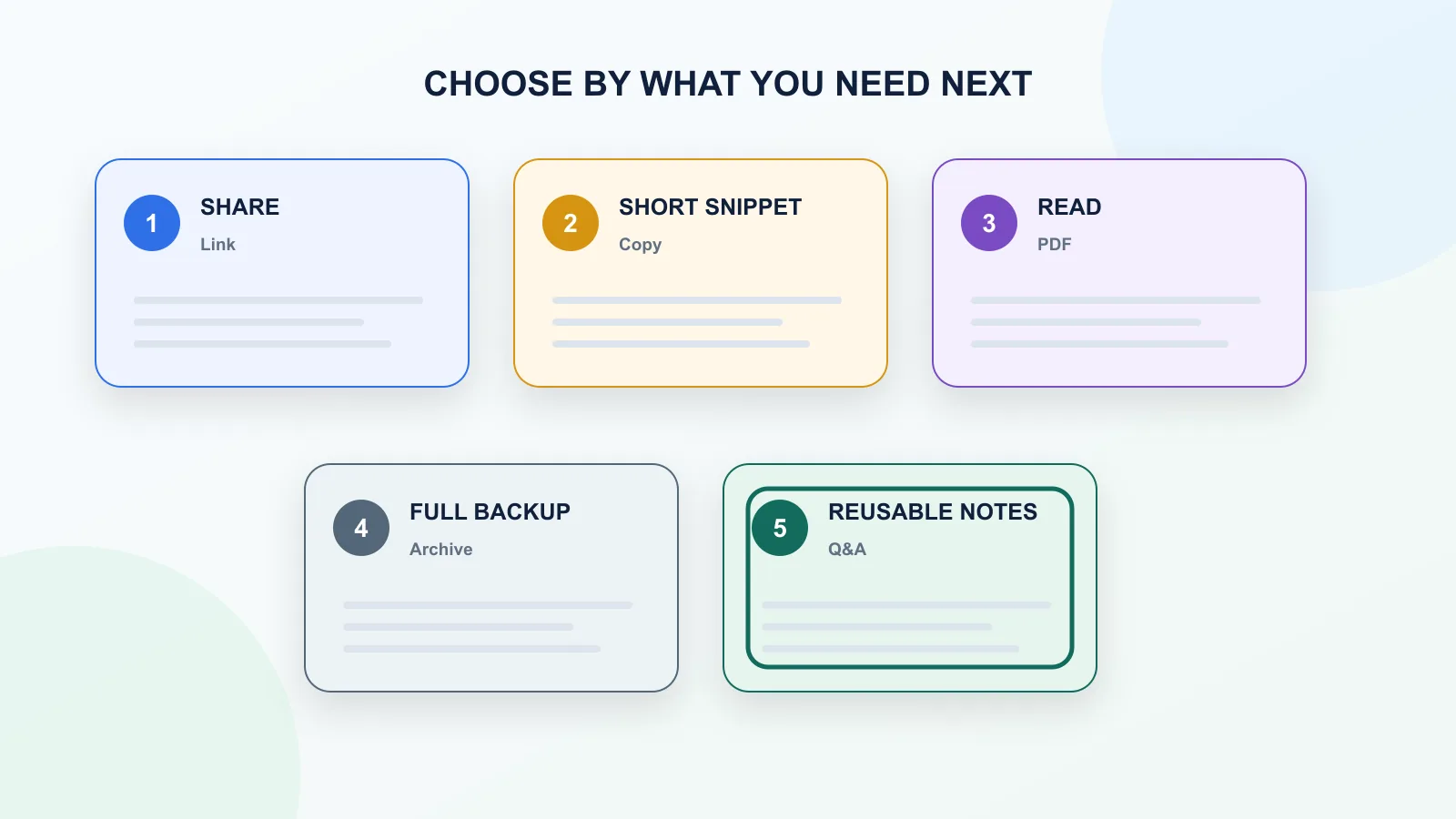
When single-chat export is not enough
Single-chat export is not the right workflow if you need:
- a full account archive;
- every historical conversation;
- a cloud backup;
- team sync;
- a polished PDF;
- JSON automation;
- export across many chats at once.
For those jobs, use a method built for that purpose.
Why Q&A structure matters for single-chat export
A single ChatGPT conversation is often useful because of the back-and-forth.
The answer alone is not always enough. The question matters too.
For example, if you save only this answer:
“Option B is better because it is simpler and easier to maintain.”
That answer is not useful unless you also know what Option A and Option B were.
Q&A structure solves this.
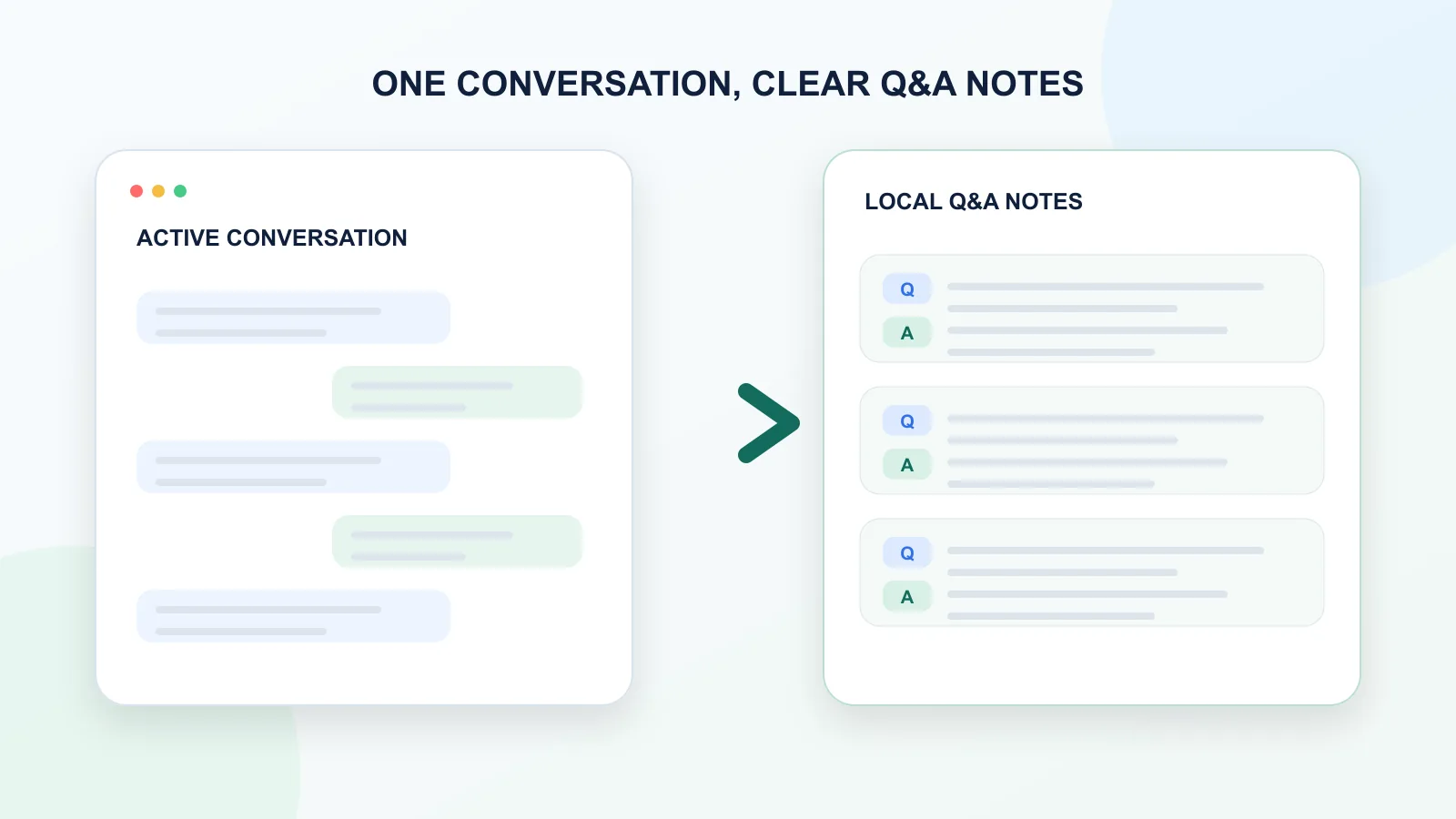
Instead of saving one long block of text, the conversation is saved as pairs:
Question: What did the user ask?
Answer: What did ChatGPT respond?
This makes the export easier to:
- read;
- search;
- review;
- quote;
- reuse;
- summarize;
- turn into notes.
For single-chat export, Q&A structure is often more useful than a raw transcript.
The Q&A guide explains how to turn a messy ChatGPT thread into clean reusable notes.
Best formats for exporting one ChatGPT conversation
| Format | Best for | Main weakness |
|---|---|---|
| TXT | Clean notes, search, reuse | No rich formatting |
| Markdown | Notes, documentation, Obsidian, developer workflows | Requires cleaner formatting |
| Reading and sharing | Harder to edit and reuse | |
| JSON | Automation and data processing | Not comfortable for normal reading |
| Shared link | Quick sharing | Not a local file |
For most single-chat exports, TXT or Markdown is best when the goal is reuse. PDF is best when the goal is reading or sharing. JSON is best when the goal is automation.
If TXT is your target format, use the dedicated guide to export ChatGPT chats as TXT.
Recommended workflow for exporting one ChatGPT conversation
A practical single-chat export workflow looks like this:
- Decide whether you need sharing, backup, reading, or reuse.
- If you only need to share, use a shared link.
- If you only need a short snippet, copy and paste it.
- If you need a readable record, print to PDF.
- If you need full account backup, use official data export.
- If you need reusable notes from one active chat, export it as TXT or Markdown.
- Preserve the original question-answer structure.
- Save the file with a clear name that includes the topic and date.
- Store it in your notes app, project folder, or local knowledge base.
This keeps the export useful after the chat is no longer fresh in your memory.
For a broader comparison of formats and workflows, read the pillar guide on how to export long ChatGPT chats.
How ChatGPT Session Saver helps
ChatGPT Session Saver is a local-first browser tool for saving one active ChatGPT conversation as clean Q&A-style TXT notes.
It is useful when you want to export a single conversation without downloading your full account history or manually copying a long thread.
It focuses on:
- one active ChatGPT conversation;
- clean TXT export;
- question-answer structure;
- local saving;
- search inside the extracted session;
- reusable notes.
It is not the best tool for every export job.
Use official data export for full account backup.
Use shared links for quick sharing.
Use PDF for visual reading.
Use ChatGPT Session Saver when you want one specific conversation saved locally as clean reusable notes.
Export one active conversation: Try ChatGPT Session Saver.
When not to use a single-chat exporter
A single-chat exporter is not always the right tool.
Use another method if you need:
- a full export of your entire ChatGPT account;
- a polished PDF for formal sharing;
- JSON for automation;
- a public link for collaboration;
- bulk export of all historical conversations;
- cloud sync across devices.
A single-chat exporter is best when the job is narrow: save this one conversation in a clean, reusable format.
Privacy considerations
Before exporting any ChatGPT conversation, think about what is inside the chat.
A conversation may include:
- personal notes;
- business ideas;
- code;
- client information;
- research;
- private drafts;
- internal decisions;
- sensitive context.
Ask these questions before choosing an export method:
- Will this create a local file or a public/shareable link?
- Will the content be uploaded to another server?
- Who can access the exported conversation?
- Can I delete or control the exported version later?
- Does the browser extension explain its permissions?
- Do I actually need to share this chat, or only save it?
For private conversations, local export is usually easier to control than cloud-based sharing. If you use a browser extension, review Chrome’s official permissions guidance, the extension’s privacy policy, and the ChatGPT export extension safety checklist before installing it.
Common mistakes
Avoid these mistakes when exporting a single ChatGPT conversation:
- using full data export when you only need one chat;
- using a shared link as if it were a private backup;
- copying only the final answer and losing the original question;
- saving a long conversation as one messy text block;
- using PDF when you need editable notes;
- installing browser extensions without checking permissions;
- forgetting to name exported files clearly.
The point of export is not just to save something. The point is to make the conversation useful later.
FAQ
Can I export only one ChatGPT conversation?
Yes. You can save one specific ChatGPT conversation using a shared link, copy-paste, print-to-PDF, or a local single-chat export tool. Official data export is better for full account backup, not quick single-chat export.
What is the best way to export one ChatGPT conversation?
If you want to share the conversation, use a shared link. If you want reusable local notes, use a TXT or Markdown export that preserves the Q&A structure.
Is official ChatGPT data export the same as single-chat export?
No. Official data export is for account-level data. Single-chat export means saving one specific conversation in a usable format.
Can I export a ChatGPT conversation as PDF?
Yes. You can usually use your browser’s print function to save a conversation as PDF. PDF is good for reading and sharing, but not ideal for editing or reuse.
Can I export a ChatGPT conversation as TXT?
Yes. You can save a conversation as TXT by copying it manually or using a tool that exports the active chat as a clean text file.
What is Q&A export?
Q&A export saves a conversation as pairs of user questions and assistant answers. This makes the chat easier to search, understand, and reuse later.
Are shared links a good backup?
Shared links are useful for sharing, but they are not the same as a private local backup. If you need long-term control, save the conversation as a local file.
What format should I use for one exported ChatGPT conversation?
Use TXT or Markdown if you want reusable notes. Use PDF if you want a readable document. Use JSON if you need automation or data processing.
Related guides
This guide is part of a practical series about saving, exporting, structuring, and reusing ChatGPT conversations.
- ChatGPT Data Export vs Single-Chat Export
- How to Download a Full ChatGPT Conversation
- How to Save a ChatGPT Conversation as PDF
- How to Export Long ChatGPT Chats Without Losing Context
- ChatGPT Session Saver
Final thought
Exporting a single ChatGPT conversation should not require downloading your entire account history or manually rebuilding the chat by copy-paste.
The best method depends on the job.
Use shared links for sharing.
Use PDF for reading.
Use official data export for account backup.
Use local Q&A-style TXT export when you want one specific conversation saved as reusable notes.
A good single-chat export keeps the conversation useful after you leave the ChatGPT interface.