How to Export ChatGPT Chats as TXT
Quick answer
You can export ChatGPT chats as TXT by saving the conversation as a plain text file.
The simplest manual method is to copy the useful parts of the conversation into a text editor and save the file with a .txt extension.
A better method for long chats is to use a TXT-first export tool that preserves the conversation as clean, searchable Q&A-style notes.
TXT is useful because it is:
- durable;
- readable;
- editable;
- searchable;
- lightweight;
- local-friendly;
- easy to convert later;
- good for Q&A notes;
- easy to reuse as context in another AI session.
Difference in one sentence: TXT export is best when you want a simple durable source file for reusable ChatGPT notes, not a polished reading document or automation-ready dataset.
What is TXT export?
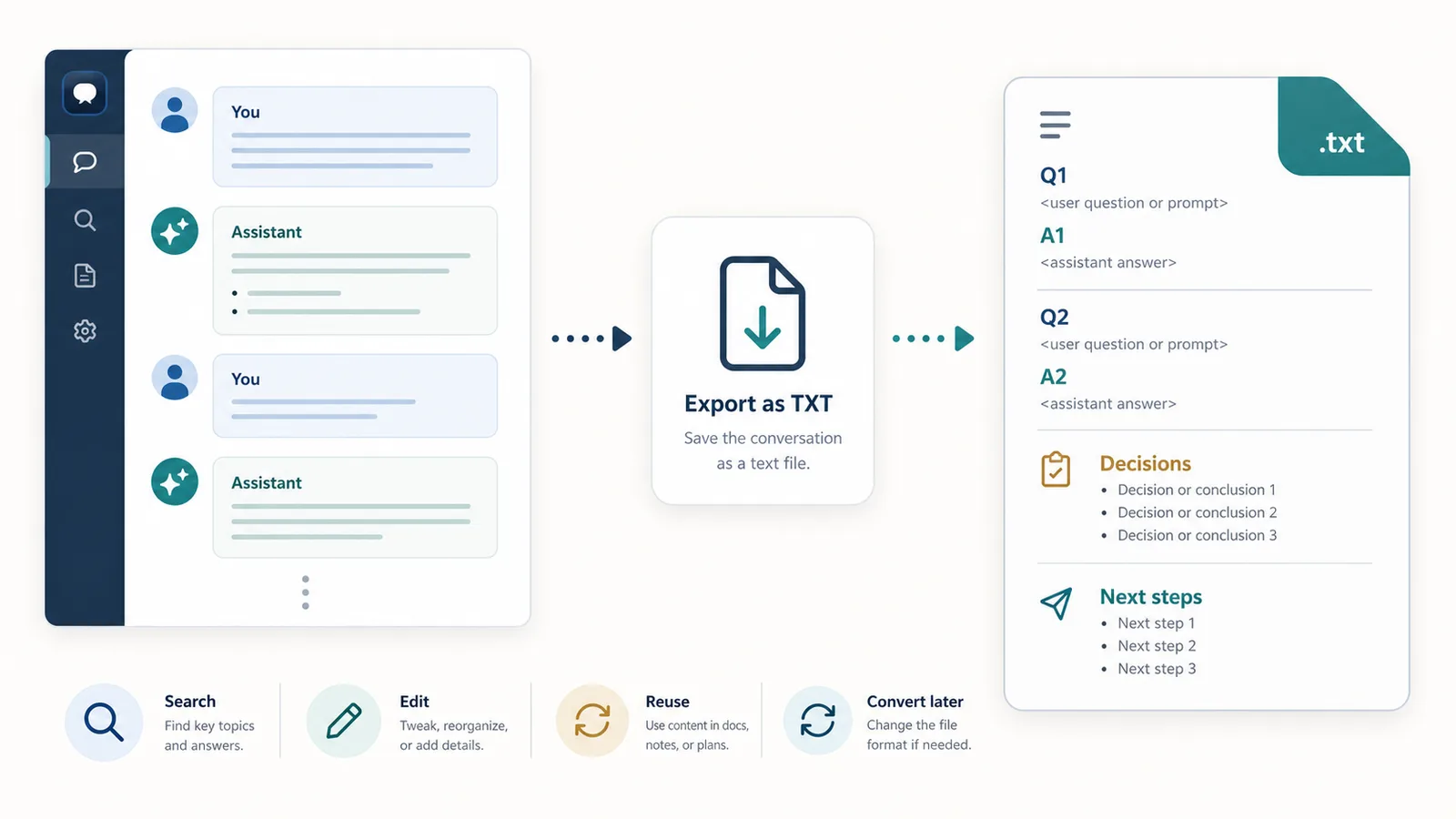
TXT export means saving a ChatGPT conversation as a plain text file.
A TXT file does not try to preserve the full visual layout of the ChatGPT interface.
Instead, it preserves the useful text.
For ChatGPT conversations, a TXT export may include:
- user prompts;
- assistant answers;
- Q&A pairs;
- code blocks;
- lists;
- summaries;
- decisions;
- drafts;
- notes;
- final outputs.
A clean TXT export is not just a dump of everything on the page.
It should preserve the conversation in a readable structure.
Why TXT is durable
TXT is one of the most durable file formats because it is simple.
A plain text file can be opened by many tools, including:
- basic text editors;
- code editors;
- notes apps;
- search tools;
- operating systems;
- command-line tools;
- AI tools;
- document editors.
TXT does not depend heavily on one platform or one app.
That makes it useful for long-term archives.
If your goal is to keep a ChatGPT conversation for future use, a simple text file is often safer than a format that depends on a specific product interface.
Why TXT is good for Q&A notes
TXT works especially well for Q&A-style notes.
A Q&A TXT export can look like this:
Q1: What is the difference between TXT and PDF for ChatGPT export?

A1: TXT is better for editable, searchable notes. PDF is better for reading, printing, and sharing a stable document.

Q2: When is Markdown better than TXT?

A2: Markdown is better when you need headings, links, code blocks, tables, or structured documentation.
This structure is simple, but powerful.
It keeps each prompt connected to the answer it produced.
That makes the saved chat easier to search, review, and reuse later.
Related guide: How to Export ChatGPT Conversations as Question-Answer Pairs
TXT is a good source format
TXT is often useful as a source format.
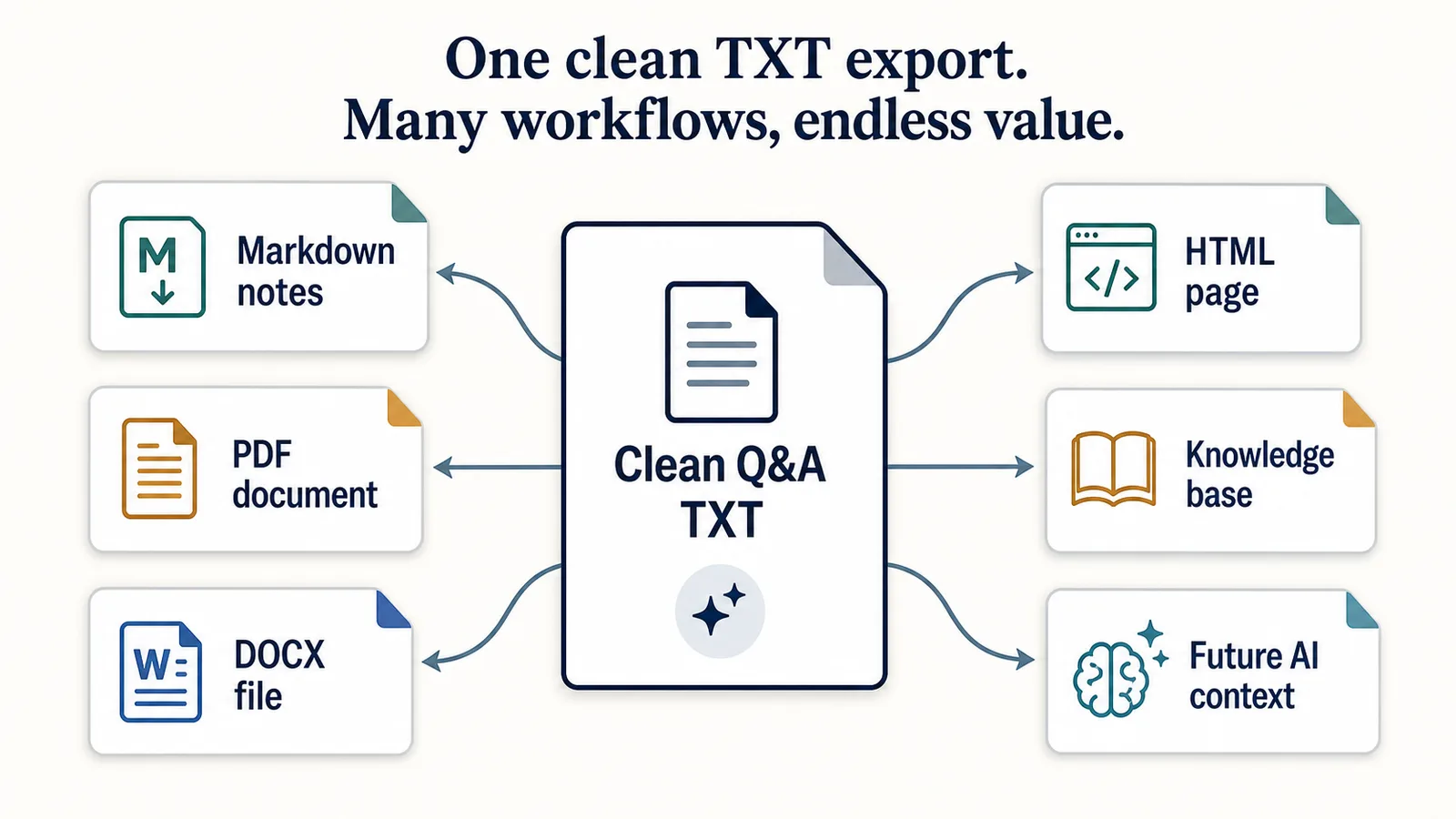
That means you can save the conversation as clean text first, then convert or adapt it later.
For example:
ChatGPT conversation
-> TXT export
-> Markdown notes
-> PDF document
-> DOCX file
-> knowledge base entry
-> new AI prompt context
The important thing is that TXT gives you a simple base file.
You are not locked into one visual format.
If the TXT export is clean and structured, it can be reused in many directions.
How to export ChatGPT chats as TXT manually
Manual TXT export is simple for short conversations.
Basic workflow:
- Open the ChatGPT conversation.
- Select the useful part of the conversation.
- Copy it.
- Open a text editor.
- Paste the content.
- Remove interface noise.
- Add clear Q&A labels if needed.
- Save the file with a
.txtextension.
Example filename:
2026-06-13-chatgpt-study-notes-photosynthesis.txt
Manual export works when the chat is short.
For long conversations, it can become slow and error-prone.
Why manual TXT export can fail
Manual copy-paste can create problems.
For example:
- missing messages;
- broken formatting;
- copied interface buttons;
- duplicated text;
- lost code indentation;
- messy tables;
- unclear message boundaries;
- missing prompts;
- final answers without context.
The main problem is not only copying text.
The main problem is preserving structure.
A good TXT export should make the conversation more reusable than the original chat, not less.
Related guide: Why Copy-Paste Fails for Long ChatGPT Conversations
How to structure a ChatGPT TXT export
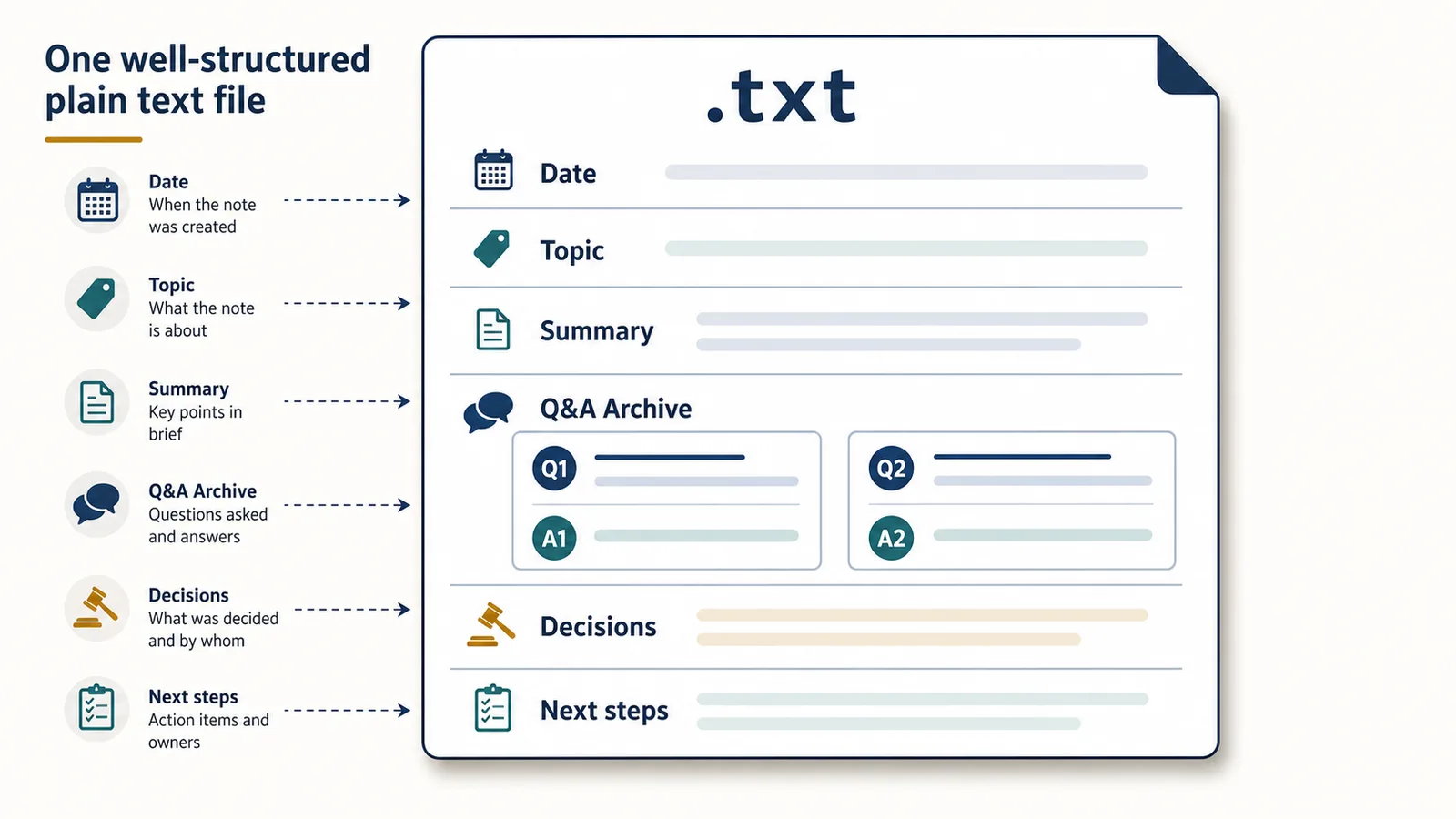
A useful TXT file should be easy to scan.
Use clear sections.
Example:
# ChatGPT Q&A Notes

Date: 2026-06-13
Topic: ChatGPT export formats
Project: Session Saver

## Summary

This conversation compared TXT, Markdown, PDF, and JSON for exporting ChatGPT conversations.

## Q&A Archive

Q1: Why is TXT durable?

A1: TXT is simple, lightweight, and easy to open across many tools.

Q2: When is PDF better?

A2: PDF is better for polished reading, printing, and sharing.

## Decisions

- Use TXT as the first export format.
- Explain how TXT can be converted later.

## Next steps

- Create a format comparison article.
- Add FAQ links for PDF and DOCX conversion.
This is still plain text, but it is structured enough to be useful.
What to include in a TXT export
A good ChatGPT TXT export may include:
- date;
- topic;
- project;
- original prompt;
- Q&A pairs;
- final answer;
- decisions;
- examples;
- code blocks;
- rejected ideas;
- summaries;
- next steps;
- source ideas to verify.
You do not need to include everything.
The goal is to keep the useful thinking trail.
What not to include in a TXT export
Avoid saving clutter.
You usually do not need:
- sidebar text;
- button labels;
- repeated UI text;
- empty messages;
- irrelevant branches;
- weak duplicate answers;
- sensitive information;
- passwords;
- tokens;
- private customer data;
- hidden or accidental pasted content.
A clean TXT export should feel like notes, not a messy scrape of the whole page.
How to name ChatGPT TXT files
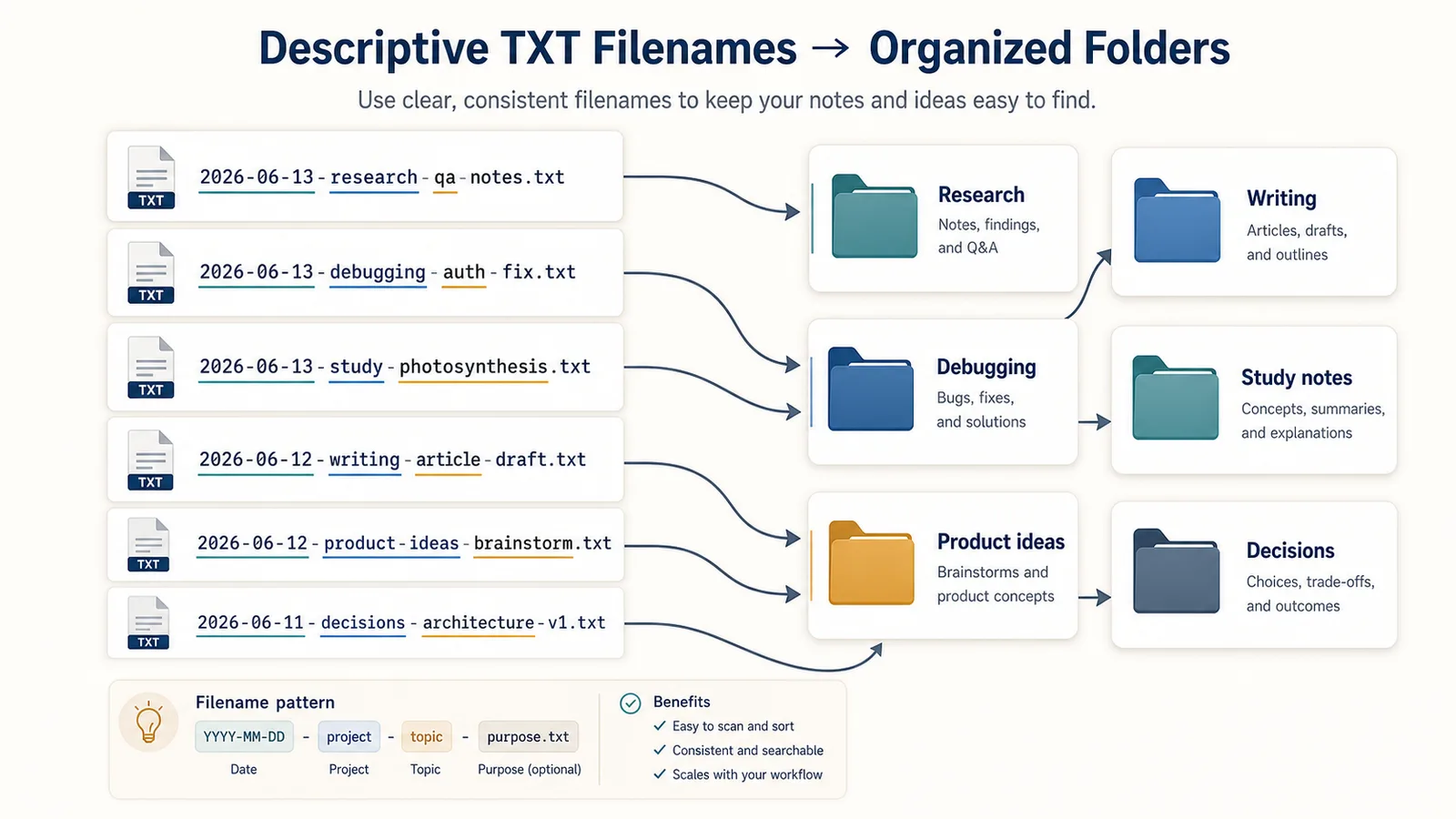
Good filenames make old exports easier to find.
Bad filenames:
chat.txt
notes.txt
export.txt
final.txt
Better filenames:
2026-06-13-chatgpt-export-formats-qa-notes.txt
2026-06-13-debugging-auth-middleware-final-fix.txt
2026-06-13-research-chatgpt-shared-links-vs-local-export.txt
2026-06-13-writing-landing-page-headline-variants.txt
A useful filename can include:
- date;
- project;
- topic;
- content type;
- purpose.
Suggested pattern:
YYYY-MM-DD-project-topic-purpose.txt
Example:
2026-06-13-session-saver-txt-export-article-notes.txt
Where to store TXT exports
Where you store TXT files matters.
Good storage options include:
- project folders;
- local notes folder;
- Obsidian vault;
- code repository documentation folder;
- research archive;
- writing archive;
- study notes folder;
- encrypted local folder for sensitive notes;
- cloud storage only if you are comfortable with the privacy tradeoff.
Example folder structure:
ChatGPT exports/
  Research/
  Writing/
  Debugging/
  Study notes/
  Product ideas/
  Decisions/
Or by project:
Session Saver/
  Research notes/
  Article drafts/
  Technical notes/
  Product decisions/
  Exported Q&A/
The exact system matters less than consistency.
A TXT export is only useful if you can find it later.
TXT for local archives
TXT is strong for local archives because it is simple and portable.
A local TXT archive gives you:
- offline access;
- local search;
- easy editing;
- simple backups;
- no dependency on a shared link;
- easy copying into future prompts;
- durable storage.
This is different from a shared link.
A shared link is useful for showing someone a conversation.
A local TXT export is useful for keeping your own reusable copy.
Related guide: ChatGPT Shared Links vs Local Export: What’s the Difference?
TXT for preserving the thinking trail
The most useful part of a ChatGPT conversation is often not the final answer.
It is the thinking trail:
- the first question;
- the constraints;
- the follow-up prompts;
- the examples;
- the rejected ideas;
- the attempted fixes;
- the comparisons;
- the decisions;
- the final output.
TXT is useful because it can preserve that trail in a simple form.
Example:
Goal:
Write a clear article about TXT export.

Rejected angle:
Do not position TXT as the only good format.

Decision:
Position TXT as the durable source format that can be converted into other formats later.

Final message:
TXT-first is a strength when the goal is reusable Q&A-style notes.
This is more useful than only saving the final paragraph.
When TXT is better than Markdown
TXT is better than Markdown when you want maximum simplicity.
Use TXT when:
- you do not need headings;
- you do not need links;
- you do not need rich code formatting;
- you want a plain local archive;
- you want easy search;
- you want easy copy-paste;
- you want a durable source file.
TXT is also good when the conversation is mostly text and Q&A.
When TXT is worse than Markdown
TXT is worse than Markdown when structure matters.
Markdown is better when you need:
- headings;
- subheadings;
- links;
- code fences;
- tables;
- lists;
- documentation;
- notes-app workflows;
- GitHub-friendly files.
Example Markdown structure:
# ChatGPT Export Notes

## Q1: Why is TXT durable?

TXT is durable because it is simple and portable.

## Q2: When is PDF better?

PDF is better for reading and sharing.
If you are building documentation or a knowledge base, Markdown may be better than TXT.
When TXT is better than PDF
TXT is better than PDF when you need to keep working with the content.
Use TXT when you want to:
- edit the conversation;
- search the text;
- reuse sections;
- copy into another prompt;
- reorganize notes;
- create Q&A archives;
- convert later.
PDF is better when the document is mostly final.
TXT is better when the conversation is still working material.
When TXT is worse than PDF
TXT is worse than PDF when presentation matters.
PDF is better when you need:
- polished layout;
- printing;
- sharing with non-technical readers;
- stable visual formatting;
- page-like reading;
- a finished document.
A TXT file is practical, but it is not polished.
If you want a final reading copy, convert TXT into a formatted document and export to PDF.
When TXT is better than JSON
TXT is better than JSON when a human is the main reader.
Use TXT when you want:
- readable notes;
- easy editing;
- Q&A archives;
- study notes;
- research logs;
- writing drafts;
- debugging notes.
JSON is better when software is the main reader.
When TXT is worse than JSON
TXT is worse than JSON when you need structured data.
JSON is better for:
- automation;
- scripts;
- databases;
- imports;
- message metadata;
- role-based processing;
- structured archives;
- developer workflows.
A TXT file can be parsed if the structure is consistent, but it is not as reliable as real JSON.
Related guide: TXT vs Markdown vs PDF vs JSON for ChatGPT Export
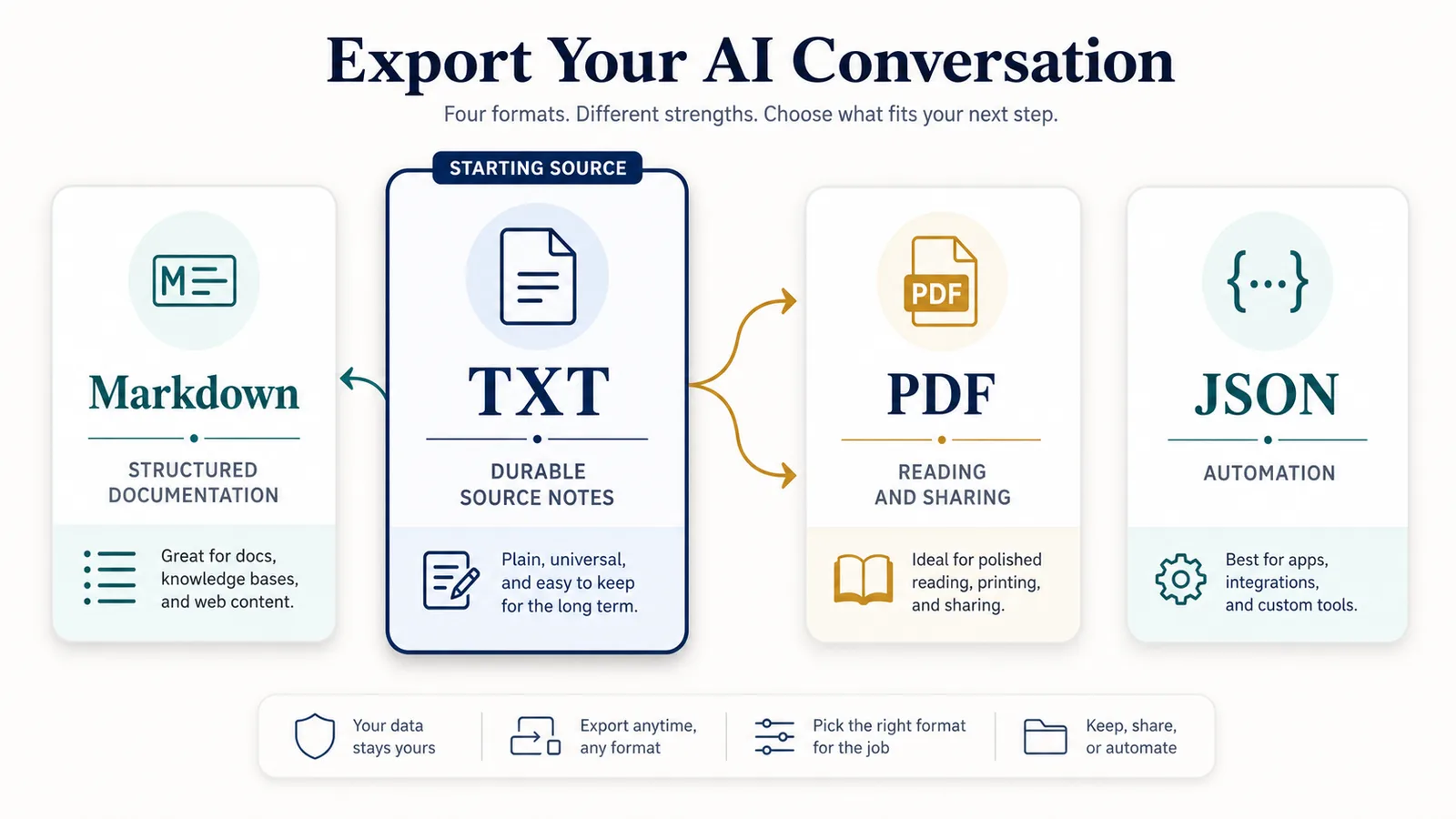
TXT conversion: the key idea
TXT is not the final format for every use case.
It can be the starting format.
A clean TXT export can become:
- a PDF;
- a Markdown document;
- a DOCX file;
- an HTML page;
- a study note;
- a research log;
- a knowledge base entry;
- a prompt context file.
But conversion has a limit.
If the TXT file does not preserve structure, conversion will not magically create it.
That is why the export should keep Q&A pairs, headings, code blocks, and sections clear from the beginning.
How to convert TXT to PDF
A practical workflow:
- Export or save the ChatGPT conversation as TXT.
- Open the TXT file in Google Docs, Microsoft Word, or another editor.
- Add basic formatting if needed.
- Export, download, or print the document as PDF.
Useful external references:
- Google Docs: create, view, or download a file
- Microsoft Word: save or convert to PDF
- Pandoc: creating a PDF
This is useful when you want a readable or shareable version of a TXT export.
How to convert TXT to Markdown
TXT can become Markdown if you add lightweight structure.
For example:
Q1: What is TXT export?
A1: TXT export means saving the conversation as a plain text file.
Can become:
## Q1: What is TXT export?

TXT export means saving the conversation as a plain text file.
Markdown is useful when you want:
- headings;
- links;
- code blocks;
- notes apps;
- documentation;
- GitHub-friendly files.
For more technical conversion workflows, see Pandoc.
How to convert TXT to DOCX
To convert TXT to DOCX:
- Open the TXT file in Microsoft Word, Google Docs, or another word processor.
- Add formatting if needed.
- Save or export the file as
.docx.
DOCX is useful when you need:
- editing in Word;
- collaboration;
- comments;
- track changes;
- formatted documents;
- business or academic workflows.
TXT is the simple source.
DOCX is the editable document format.
How to convert TXT to HTML
TXT can be converted into HTML, but the result depends on structure.
A plain TXT file with no headings may become a basic text page.
A structured TXT or Markdown file converts better.
If you want HTML output, it is often better to:
TXT -> Markdown -> HTML
instead of:
TXT -> HTML
Markdown gives the converter more structure to work with.
How to convert TXT to JSON
TXT can be converted into JSON only if the text has a consistent structure.
For example, this is easier to parse:
Q1: What is TXT export?
A1: TXT export means saving a conversation as plain text.

Q2: Why is TXT durable?
A2: TXT is simple and easy to open in many tools.
This could become:
[
  {
    "question": "What is TXT export?",
    "answer": "TXT export means saving a conversation as plain text."
  },
  {
    "question": "Why is TXT durable?",
    "answer": "TXT is simple and easy to open in many tools."
  }
]
But TXT is not ideal for JSON workflows.
If you need reliable structured data, use a true JSON export or build a parser around a very consistent TXT format.
How ChatGPT Session Saver fits
ChatGPT Session Saver is TXT-first.
It is a local-first browser tool for saving one active ChatGPT conversation as clean Q&A-style TXT notes.
That makes it useful when you want:
- a local text file;
- reusable Q&A notes;
- the thinking trail of one active conversation;
- simple search;
- easy editing;
- a durable source format;
- a file that can be converted later.
It is not:
- a PDF-first exporter;
- a JSON automation tool;
- a full account export tool;
- a cloud backup product;
- a bulk historical archive.
It also does not automatically create summaries, decisions, or next-step sections. Those are optional structures you can add to the exported Q&A notes when they help.
Use ChatGPT Session Saver when the first thing you need is a clean TXT source file.
Then convert or adapt that TXT file if you need PDF, Markdown, DOCX, HTML, or another format.
Example workflow: TXT-first, then convert
A practical workflow might look like this:
1. Save the active ChatGPT conversation as TXT.
2. Review the Q&A structure.
3. Remove anything unnecessary.
4. Rename the file clearly.
5. Store it in the right project folder.
6. Convert it only if needed.
For example:
ChatGPT Session Saver
-> clean Q&A TXT
-> Markdown for docs
-> PDF for sharing
-> DOCX for editing
-> JSON only if parsed for automation
This keeps the first export simple and durable.
Common mistakes
Avoid these mistakes when exporting ChatGPT chats as TXT:
- saving a messy wall of text;
- losing the original prompts;
- not marking Q&A pairs;
- using unclear filenames;
- saving sensitive information unnecessarily;
- forgetting where files are stored;
- expecting TXT to preserve visual layout;
- using TXT when you really need structured JSON;
- using PDF when you need editable notes;
- converting messy TXT into another messy format.
The quality of the TXT source matters.
A clean TXT file can become many things.
A messy TXT file usually stays messy after conversion.
Part of the ChatGPT Export Guides
This guide is part of a practical series about saving, exporting, structuring, and reusing ChatGPT conversations.
- Compare all long-chat export methods
- Compare shared links and local export
- Export one specific ChatGPT conversation
- Export ChatGPT conversations as question-answer pairs
- Compare TXT, Markdown, PDF, and JSON export formats
- Understand why copy-paste fails
- Save a long conversation without scrolling forever
- Turn a messy thread into clean Q&A notes
- Understand why long chats are hard to reuse later
- Learn how browser extensions read an active page
- Understand why export extensions break after interface updates
- Save developer debugging conversations
- Archive writing and brainstorming sessions
- Save research conversations as structured notes
- Turn ChatGPT chats into study notes
- Is it safe to use a ChatGPT export extension?
- Read the ChatGPT export glossary
- Install ChatGPT Session Saver
- Read the Session Saver privacy policy
FAQ
How do I export ChatGPT chats as TXT?
You can export a ChatGPT chat as TXT by copying the useful conversation into a plain text file or by using a TXT-first export tool that saves the active conversation as clean text notes.
For short chats, manual copy-paste can be enough.
For long chats, a structured TXT export is usually better because it can preserve prompts, answers, and message order more clearly.
Why is TXT good for ChatGPT export?
TXT is good for ChatGPT export because it is durable, searchable, editable, lightweight, local-friendly, and easy to convert later.
It is especially useful for Q&A-style notes where the main goal is to preserve useful conversation text, not visual layout.
Is TXT good for ChatGPT Q&A notes?
Yes. TXT works well for ChatGPT Q&A notes because it can preserve simple prompt-answer structure.
Example:
Q: What should I remember?
A: The key idea is...
This makes the conversation easier to search, review, and reuse later.
How should I name ChatGPT TXT export files?
Use filenames that include date, topic, project, and purpose.
Example:
2026-06-13-chatgpt-export-formats-qa-notes.txt
Avoid vague filenames like chat.txt or notes-final.txt.
Where should I store ChatGPT TXT exports?
Store TXT exports in organized local folders, project folders, a notes app, or a knowledge base.
For sensitive conversations, consider a local or encrypted folder instead of general cloud storage.
How to Export ChatGPT Chats as PDF?
A practical workflow is:
ChatGPT chat
-> TXT export
-> Google Docs, Microsoft Word, or editor
-> PDF
Useful references:
- Google Docs: create, view, or download a file
- Microsoft Word: save or convert to PDF
- Pandoc: creating a PDF
Use PDF when you want a reading or sharing copy.
Use TXT when you want editable reusable notes.
How to Export ChatGPT Chats as Markdown?
Start with a TXT export, then add Markdown structure:
# ChatGPT Notes

## Q1: What was the question?

Answer text...
Markdown is better than TXT when you need headings, links, code fences, tables, or documentation-style notes.
For technical conversion workflows, see Pandoc.
How to Export ChatGPT Chats as DOCX?
A practical workflow is:
ChatGPT chat
-> TXT export
-> Google Docs or Microsoft Word
-> DOCX
DOCX is useful when you need word processor editing, comments, collaboration, or business/academic formatting.
How to Export ChatGPT Chats as JSON?
TXT is not the best source for JSON unless the TXT file has a consistent structure.
You can parse a clean Q&A TXT file into JSON with a script, but this is a developer workflow.
If you need reliable metadata, roles, timestamps, or structured automation, a true JSON export is better than converting plain text.
How to Export ChatGPT Chats as HTML?
TXT can become HTML, but the output is usually better if you first add Markdown structure.
A common workflow is:
TXT -> Markdown -> HTML
This helps preserve headings, lists, code blocks, and links.
Can TXT be converted into other formats?
Yes. A clean TXT export can be converted into PDF, Markdown, DOCX, HTML, or even parsed into JSON.
But conversion works best when the TXT file already has clear structure.
A messy TXT file usually becomes a messy PDF, DOCX, or HTML file.
When is TXT worse than Markdown?
TXT is worse than Markdown when you need headings, links, code block formatting, tables, or documentation-style structure.
Markdown is usually better for knowledge bases, developer notes, and structured documents.
When is TXT worse than PDF?
TXT is worse than PDF when you need polished layout, printing, stable visual formatting, or easy sharing with non-technical readers.
PDF is better for finished reading copies.
TXT is better for editable notes.
When is TXT worse than JSON?
TXT is worse than JSON when you need automation, scripts, structured data, metadata, database imports, or role-based processing.
JSON is better for machines.
TXT is better for humans.
Final thought
TXT is not the flashiest ChatGPT export format.
That is exactly why it is useful.
A clean TXT file is durable, searchable, editable, local, and easy to convert later.
If your goal is to preserve the thinking trail of a ChatGPT conversation as reusable Q&A notes, TXT is often the strongest starting point.
Save the conversation as clean TXT first.
Then convert it only when you need another format.