How Developers Can Save ChatGPT Debugging Conversations
Quick answer
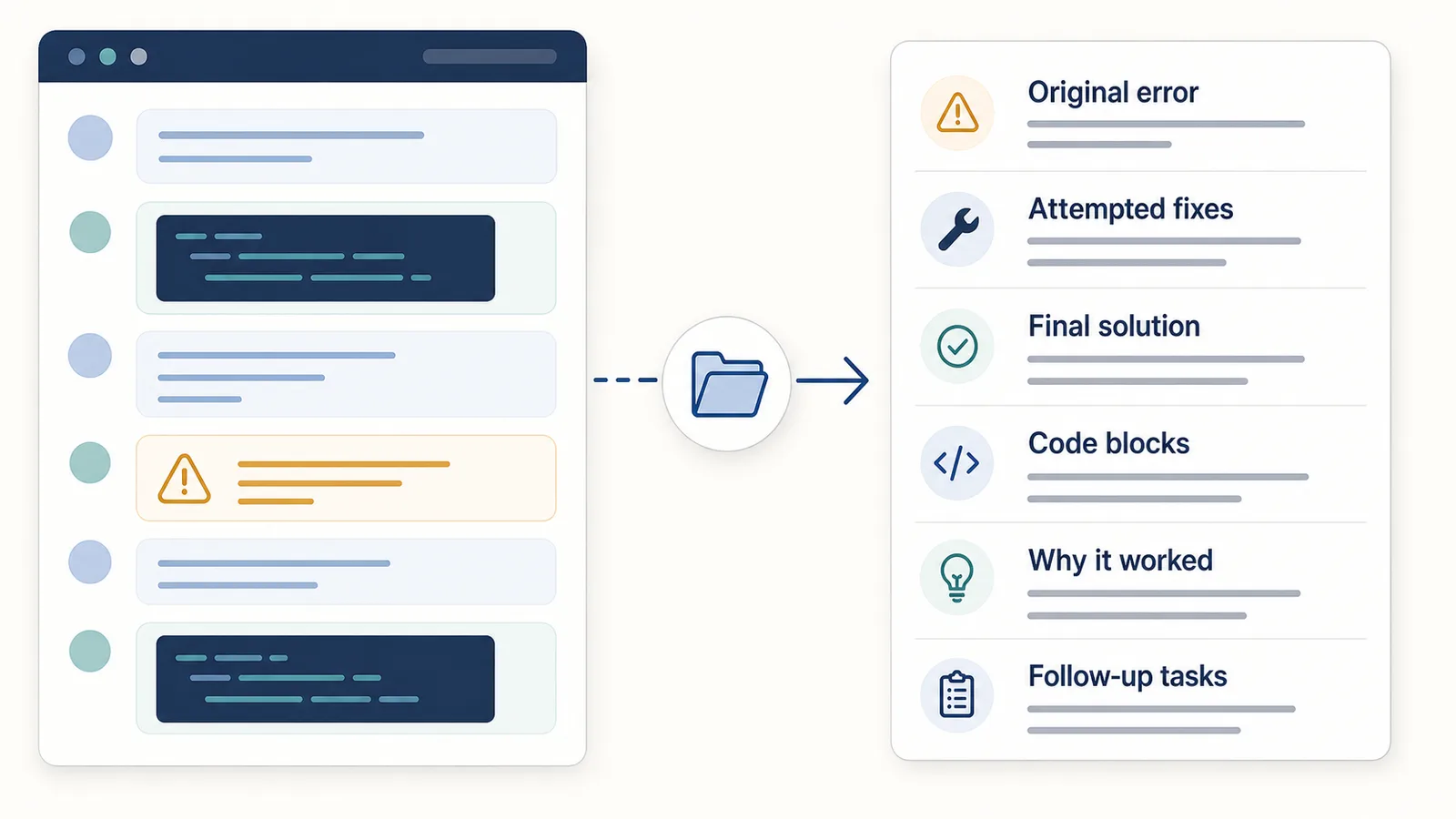
Developers can save ChatGPT debugging conversations by preserving the original error, the prompt that explained the problem, the attempted fixes, the code blocks, the final solution, and the explanation of why the fix worked.
The goal is not just to save the chat.
The goal is to save the debugging history in a way that can be searched, reviewed, reused, and turned into documentation later.
A useful debugging export should preserve:
- the original error message;
- the relevant code or stack trace;
- the prompt and constraints;
- attempted fixes;
- failed approaches worth remembering;
- the final working solution;
- code blocks;
- explanation of why the solution worked;
- follow-up tasks or edge cases.
Difference in one sentence: A saved debugging conversation is useful when it preserves the path from original error to final solution, not just the final code snippet.
Why developers should save debugging conversations
ChatGPT debugging sessions often contain useful technical reasoning.
A single conversation may include:
- the original error;
- project context;
- environment details;
- a stack trace;
- broken code;
- possible causes;
- attempted fixes;
- code snippets;
- explanations;
- a final working solution;
- follow-up improvements.
In the moment, it feels obvious what happened.
Later, it may be hard to remember:
- what caused the bug;
- which fix actually worked;
- which attempts failed;
- what dependency or environment detail mattered;
- why the final solution was chosen;
- whether the bug could appear again.
That is why useful debugging chats should not stay trapped inside a temporary conversation.
They should become structured debugging notes.
The problem with saving only the final solution
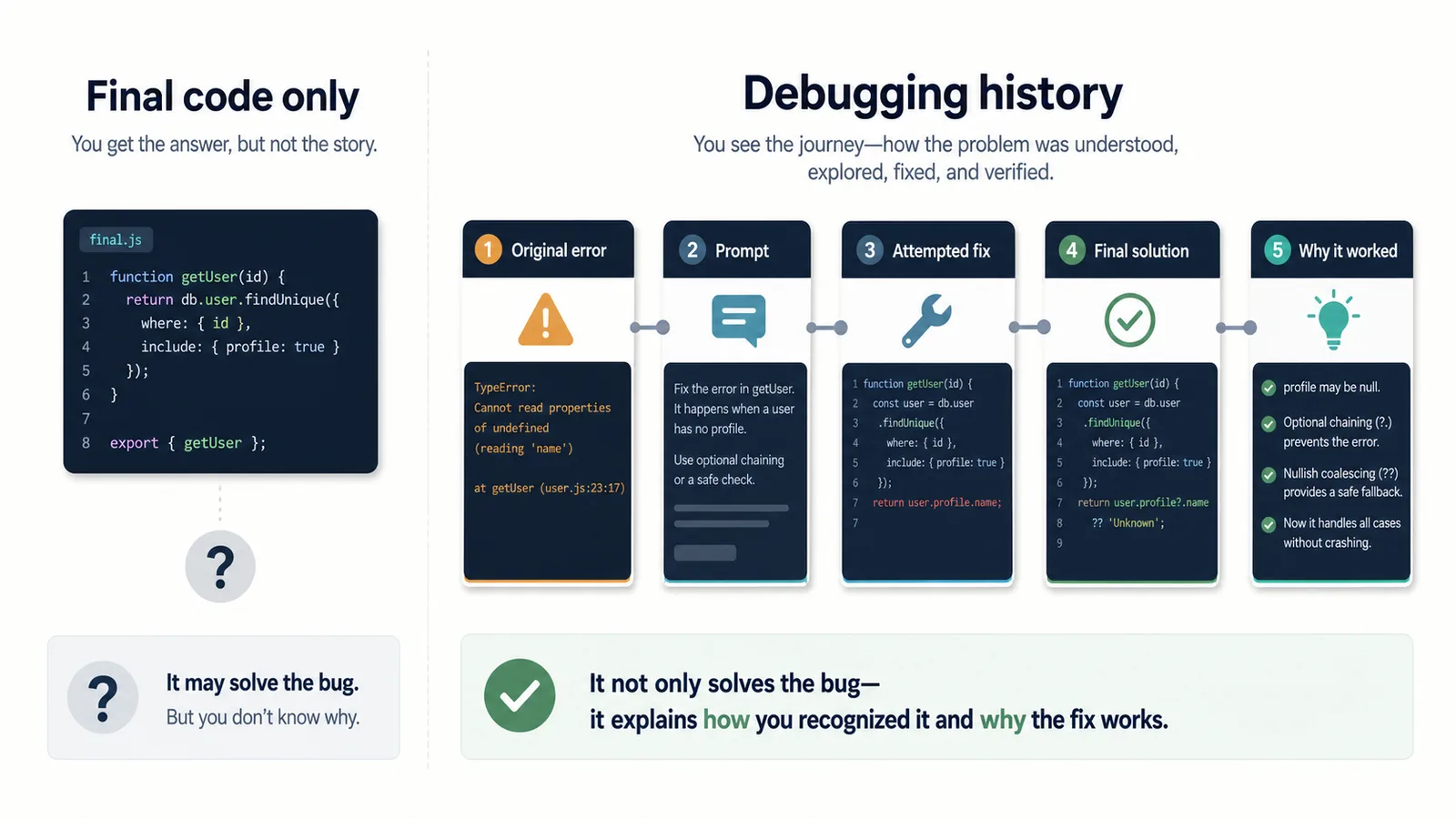
Many developers copy only the final code block.
That can work for small issues, but it often loses important context.
The final code may not explain:
- what the original bug was;
- what error message triggered the investigation;
- what assumptions were wrong;
- what fixes failed;
- what environment details mattered;
- why the chosen solution worked;
- whether there are edge cases.
Example:
const fixedValue = value ?? defaultValue;
This line might be the final fix, but without context you may not remember:
- what was
undefined; - why the fallback mattered;
- whether
nullshould be handled the same way; - what test case failed;
- whether this was a frontend or backend issue.
A reusable debugging note should preserve the reasoning around the fix.
What a good debugging export should include
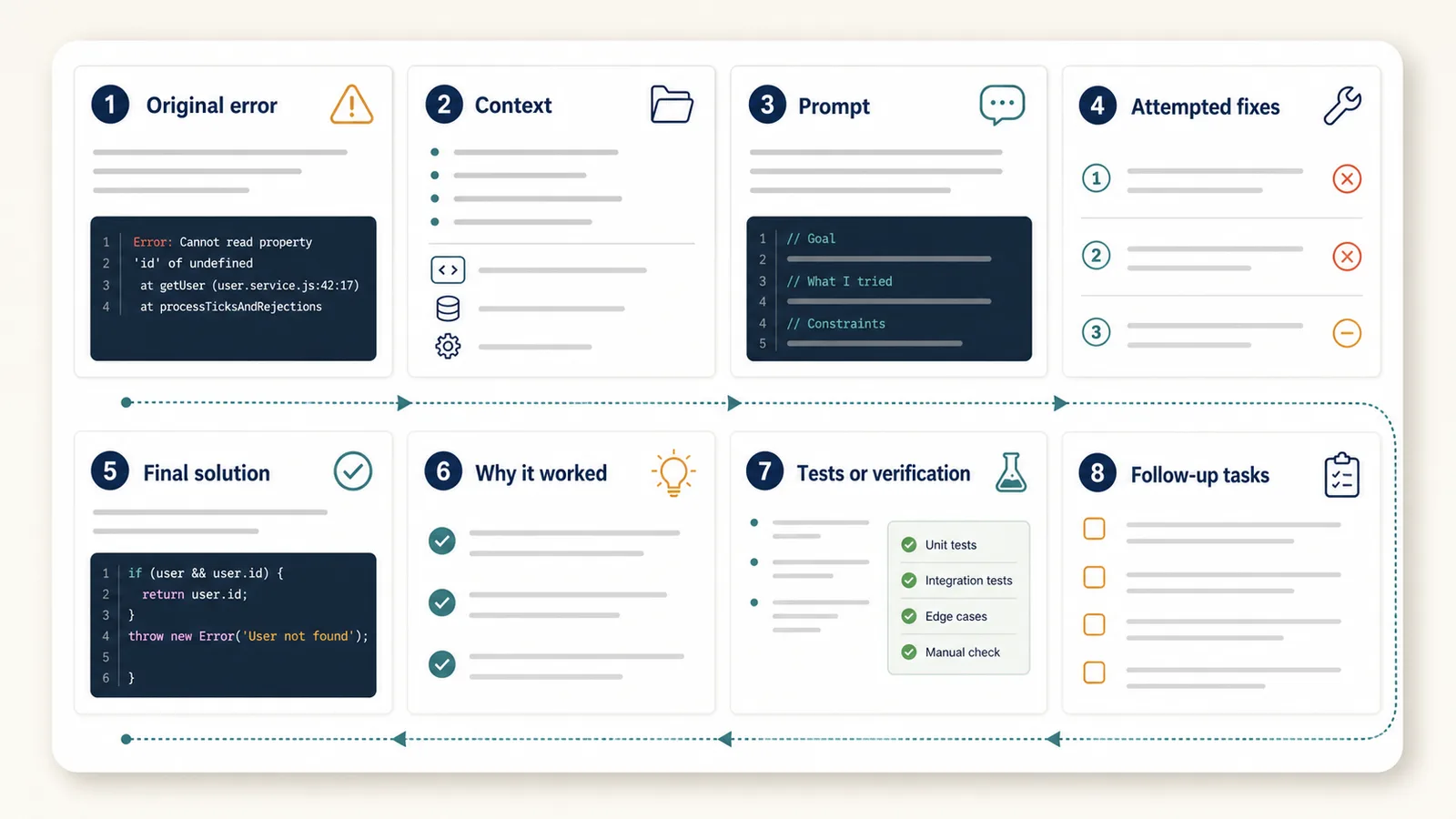
A useful debugging note should be more structured than a raw transcript.
At minimum, save:
| Section | What it captures |
|---|---|
| Original error | The exact error message, stack trace, or failing behavior |
| Context | Framework, language, environment, dependencies, relevant files |
| Prompt | How you described the problem to ChatGPT |
| Attempted fixes | What was tried before the final solution |
| Final solution | The code or configuration that worked |
| Explanation | Why the solution worked |
| Edge cases | What could still break |
| Follow-up tasks | Tests, refactoring, docs, or cleanup |
This turns a debugging chat into a reusable technical note.
Save the original error
The original error is the anchor of the debugging conversation.
Without it, the saved chat may become confusing later.
Bad saved note:
Fixed auth middleware issue.
Better saved note:
Original error:
TypeError: Cannot read properties of undefined (reading 'token')

Context:
Express middleware was trying to read req.user.token before req.user was set.
The exact error helps you find the note later.
It also helps future you understand whether the same bug has appeared again.
Save the prompt
The prompt matters because it explains how you framed the bug.
A useful debugging prompt may include:
- the error message;
- the relevant code;
- what you expected to happen;
- what actually happened;
- what you already tried;
- framework or runtime version;
- constraints;
- what kind of answer you wanted.
Example:
Q1: I am getting "Cannot read properties of undefined (reading 'token')" in an Express auth middleware. Here is the middleware code. I expected req.user to exist after the auth check, but it is undefined. What could be wrong?
The assistant answer only makes sense because of this prompt.
If you save the answer without the prompt, you lose the debugging context.
Save attempted fixes
Attempted fixes are not always clutter.
Sometimes they are valuable because they show what was ruled out.
For example, a debugging conversation may try:
- changing a conditional;
- adding a null check;
- moving middleware order;
- updating a dependency;
- checking environment variables;
- changing async behavior;
- adding logging;
- rewriting a query.
Not every failed attempt needs to be saved in detail.
But you should preserve attempts that explain the final solution.
Example:
Attempted fix 1:
Added a fallback value. This prevented the crash but did not solve the missing auth state.

Attempted fix 2:
Checked the JWT parsing function. It worked correctly.

Final fix:
Moved the auth middleware before the route handler that reads req.user.
This makes the debugging history useful later.
Save the final solution
The final solution should be easy to find.
Do not bury it inside a long transcript.
A good debugging note should clearly mark:
Final solution:
or:
Working fix:
Then include the final code block.
Example:
app.use(parseAuthToken);
app.use(loadUserFromToken);

app.get("/dashboard", requireUser, dashboardHandler);
And add a short explanation:
Why it worked:
The route handler expected req.user to exist, but loadUserFromToken was registered after the route. Moving it before the protected route ensures req.user is available before requireUser runs.
This is much more reusable than a copied code block alone.
Code blocks matter
Debugging conversations often contain code.
A good export should preserve code blocks clearly.
Bad export:
app.use(parseAuthToken);
app.use(loadUserFromToken);

app.get("/dashboard", requireUser, dashboardHandler);
Better export:
app.use(parseAuthToken);
app.use(loadUserFromToken);
app.get("/dashboard", requireUser, dashboardHandler);
Code formatting matters because it helps you:
- read the solution;
- copy it safely;
- compare versions;
- spot indentation or syntax issues;
- reuse the snippet later.
Markdown is often useful for developer notes because it handles code blocks cleanly.
Related guide: TXT vs Markdown vs PDF vs JSON for ChatGPT Export
Why Q&A structure helps debugging history
Debugging is naturally question-answer based.
You ask:
- why is this error happening?
- what could cause it?
- what should I check first?
- why did this attempted fix fail?
- what is the safest fix?
- how should I test it?
The assistant answers each question.
If the conversation is saved as one raw transcript, the path can become hard to scan.
Q&A structure keeps each step connected:
Q1: What does this error mean?
A1: It means...

Q2: Could this be caused by middleware order?
A2: Yes, because...

Q3: What is the safest fix?
A3: Move the middleware before...
This makes the debugging history easier to review later.
Related guide: How to Export ChatGPT Conversations as Question-Answer Pairs
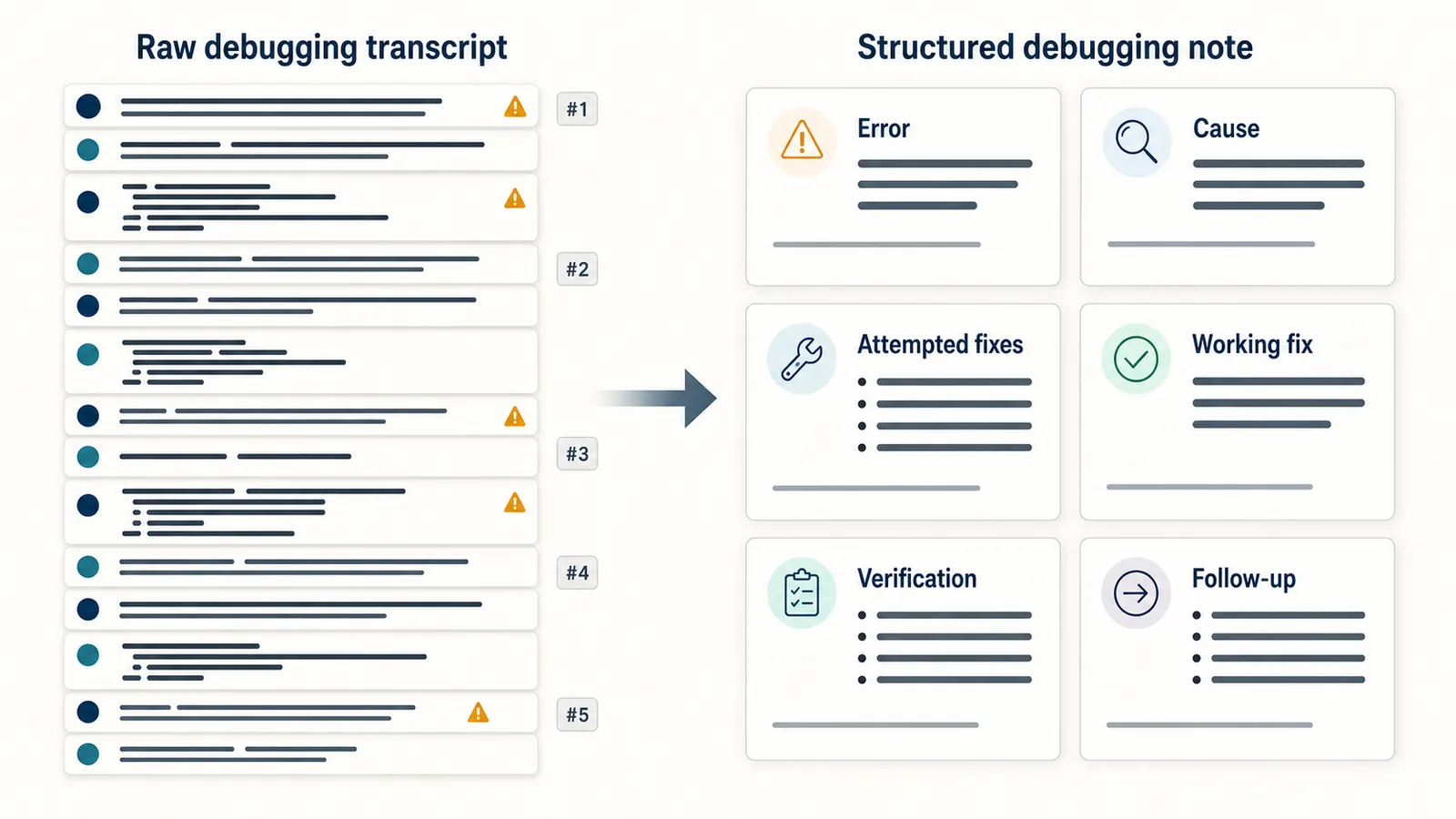
Raw transcript vs debugging note
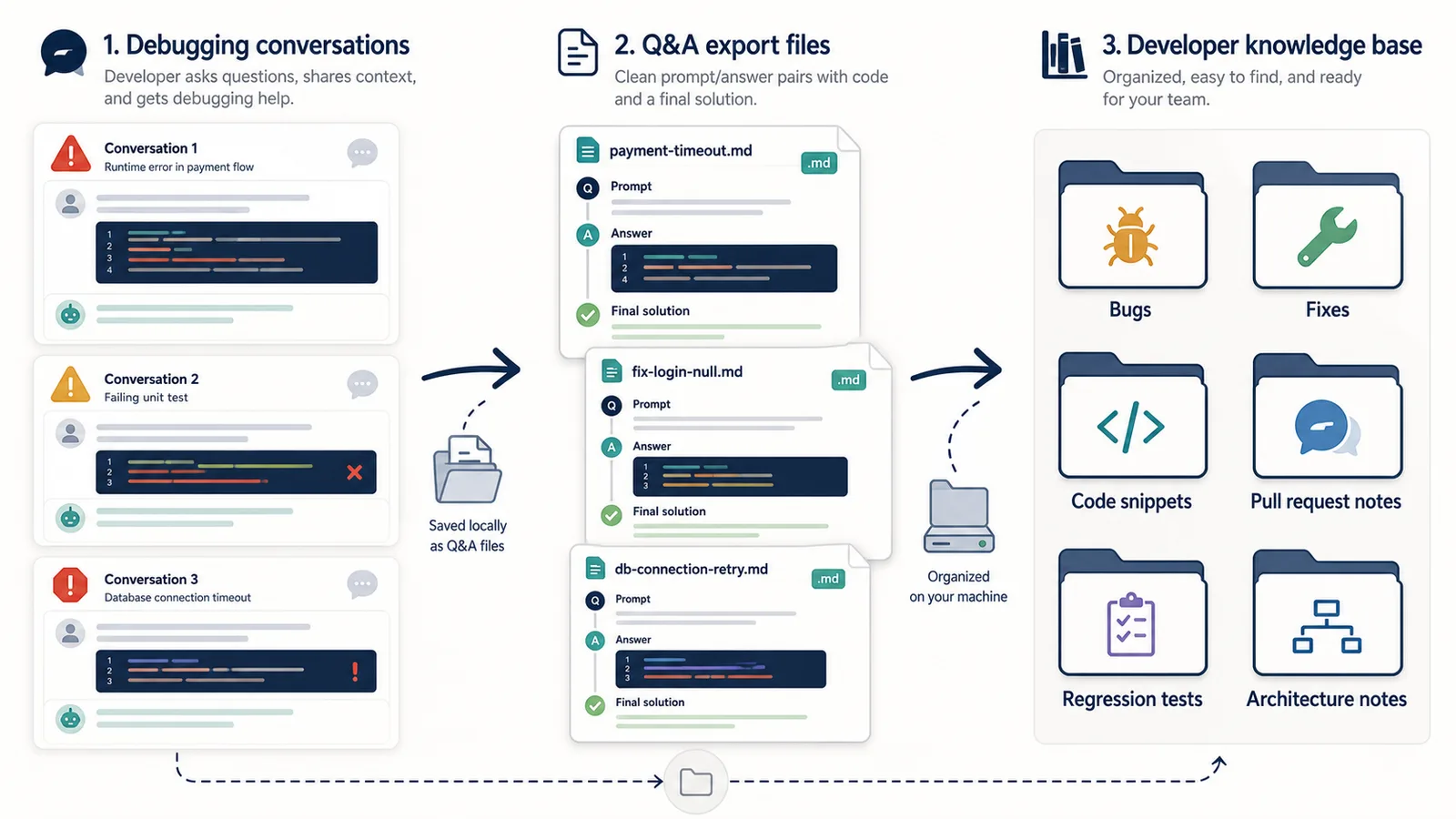
A raw transcript preserves everything in order.
A debugging note preserves the useful structure.
| Raw transcript | Structured debugging note |
|---|---|
| Chronological chat log | Error → attempts → final solution |
| Hard to find the working fix | Final solution is clearly marked |
| Failed attempts mixed with useful answers | Important failed attempts are summarized |
| Code blocks may be scattered | Relevant code is grouped |
| Hard to reuse later | Easy to search and reference |
The goal is not to save every word.
The goal is to preserve the debugging path.
Debugging note template
You can use this simple template for ChatGPT debugging conversations:
# Debugging note title

Date:
Project:
Environment:
Files involved:

## Original error

Paste the exact error message or stack trace.

## Context

What was expected?
What actually happened?
What changed recently?

## Q&A history

### Q1: What could be causing this error?

A1:

### Q2: What should I check first?

A2:

### Q3: Why did this attempted fix fail?

A3:

## Attempted fixes

- Attempt 1:
- Attempt 2:
- Attempt 3:

## Final solution

```language
// final code here
```

## Why this worked

Explain the cause and why the final fix solved it.

## Tests or verification

* Test 1:
* Test 2:

## Follow-up tasks

* Add regression test
* Update docs
* Refactor later
This template keeps the note technical but readable.
Example: messy debugging chat vs structured note
A messy debugging conversation might look like this:
User: This React component keeps re-rendering forever.
Assistant: It may be caused by state updates inside useEffect...
User: Here is the code.
Assistant: The dependency array includes a value that changes on every render...
User: I tried removing it but then data does not update.
Assistant: Try memoizing the callback...
User: That fixed it. Explain why.
Assistant: The callback identity changed on every render...
A structured debugging note is easier to reuse:
Original error:
React component re-renders continuously after data fetch.

Cause:
A callback passed into useEffect changed identity on every render.

Attempted fix:
Removing the dependency stopped the loop but broke data updates.

Final solution:
Memoize the callback so the dependency is stable.

Why it worked:
useEffect stopped re-running unnecessarily because the dependency no longer changed on every render.
The structured version is shorter and more useful.
Save environment details
Some bugs only make sense with environment context.
Save details such as:
- language;
- framework;
- runtime;
- package version;
- browser;
- operating system;
- deployment environment;
- API version;
- database;
- build tool;
- recent changes.
Example:
Environment:
- Next.js 14
- React 18
- Node.js 20
- Vercel deployment
- Error only appears in production
This helps when the same issue returns later.
It also helps when you need to write a GitHub issue, commit message, or pull request description.
Save tests and verification
A debugging note should not stop at the fix.
It should also explain how the fix was verified.
For example:
Verification:
- Reproduced the original error locally.
- Applied middleware order change.
- Confirmed protected route no longer crashes.
- Added regression test for missing user object.
This makes the note more reliable.
It also helps if the fix needs to be reviewed later.
Use ChatGPT debugging notes for commit messages
A structured debugging note can help you write better commit messages.
Instead of:
fix bug
You can write:
Fix auth middleware order for protected routes

The dashboard route accessed req.user before the user-loading middleware ran.
Moved loadUserFromToken before protected routes and added a regression test.
The saved ChatGPT conversation gives you the raw material.
The final commit message should be concise and human-reviewed.
Use debugging notes for pull requests
A good debugging export can also support pull request descriptions.
PR structure:
Problem:
What was broken?

Cause:
Why did it happen?

Fix:
What changed?

Verification:
How was it tested?

Follow-up:
What remains?
This is often the same structure as a good debugging note.
ChatGPT can help create the explanation, but you should review it before committing or publishing anything.
What not to save
A debugging export should not include unnecessary clutter.
You usually do not need:
- every repeated assistant answer;
- unrelated UI text;
- abandoned ideas that add no context;
- sensitive tokens or credentials;
- private production data;
- full logs with secrets;
- copied sidebar text;
- irrelevant conversation branches.
Before saving a debugging chat, remove secrets.
Never keep API keys, passwords, access tokens, private customer data, or credentials inside exported notes.
Sensitive debugging conversations
Debugging chats can contain sensitive technical information.
Be careful with:
- API keys;
- database credentials;
- production logs;
- customer data;
- private repository code;
- internal infrastructure details;
- security-related issues;
- unreleased product information.
For sensitive debugging sessions, prefer a local export and remove secrets before saving or sharing the file.
Related guide: Is It Safe to Use a ChatGPT Export Extension?
Best formats for debugging conversations
For developers, Markdown is often the best format because it handles code blocks and headings well.
TXT is also useful for simple local notes.
| Format | Best for debugging | Limitation |
|---|---|---|
| TXT | Simple local notes and search | Less structure for code-heavy notes |
| Markdown | Code blocks, headings, docs, PR notes | Requires Markdown-friendly tools |
| Reading or sharing a finished explanation | Harder to edit and copy code from | |
| JSON | Automation or structured logs | Not comfortable for normal reading |
Use Markdown when the conversation includes code and explanations.
Use TXT when you want a simple searchable archive.
Use PDF only when you need a reading copy.
Use JSON when you are building a tool or automation workflow.
How ChatGPT Session Saver helps
ChatGPT Session Saver is a local-first browser tool for saving one active ChatGPT conversation as clean Q&A-style TXT notes.
For developers, it can preserve the original prompts, assistant answers, code blocks, and debugging sequence as a local text file.
It does not automatically identify the root cause, decide which attempted fix matters, select the final solution, verify the code, or create the debugging-note sections shown in this guide. Developers apply labels such as “Original error,” “Working fix,” and “Why it worked” manually after export.
It is useful when you want to keep:
- the original error prompt;
- assistant answers;
- debugging Q&A structure;
- attempted fixes;
- final explanation;
- reusable local text notes.
It is not:
- a code review tool;
- a Git client;
- a test runner;
- a full account backup;
- a PDF-first exporter;
- a JSON automation product.
Use it when one active ChatGPT debugging conversation should become a clean local Q&A note.
When not to export a debugging conversation
You do not always need to export a debugging chat.
Do not export the full conversation if:
- it contains secrets you cannot remove;
- the issue was trivial;
- the final fix is already documented;
- the conversation includes private production data;
- the chat was only temporary;
- you only need one small snippet.
Sometimes the better workflow is to copy only the final cleaned explanation into a commit message, issue, or PR.
Common mistakes
Avoid these mistakes when saving ChatGPT debugging conversations:
- saving only the final code;
- losing the original error;
- keeping secrets inside exported notes;
- failing to mark the final solution;
- keeping every failed attempt without context;
- losing code block formatting;
- using PDF when you need editable code;
- mixing unrelated bugs in one file;
- not recording how the fix was verified;
- trusting generated explanations without checking them.
A debugging note is only useful if it helps you understand and verify the solution later.
Part of the ChatGPT Export Guides
This guide is part of a practical series about saving, exporting, structuring, and reusing ChatGPT conversations.
FAQ
How should developers save ChatGPT debugging conversations?
Developers should save the original error, the prompt, attempted fixes, assistant answers, code blocks, final solution, and explanation of why the fix worked.
Why is it important to save the original error?
The original error explains what problem the debugging conversation was trying to solve. Without it, the final solution may be hard to understand or reuse later.
Should I save every attempted fix from a debugging chat?
You do not need to save every failed attempt, but useful attempted fixes should be preserved when they explain what was ruled out or why the final solution worked.
What format is best for saving debugging conversations?
TXT and Markdown are usually best for debugging notes. Markdown is especially useful when the conversation contains code blocks, headings, and technical explanations.
Why does Q&A structure help debugging history?
Q&A structure keeps each prompt, error, attempted fix, and assistant answer connected. This makes the debugging path easier to review and reuse later.
Is PDF good for saving debugging conversations?
PDF is useful for reading or sharing a finished debugging explanation, but TXT or Markdown is usually better when you need editable code notes.
Can ChatGPT debugging chats replace code comments or documentation?
No. Debugging chats can help preserve the reasoning path, but final fixes should still be documented in code comments, commit messages, pull requests, or project docs when needed.
What should a reusable debugging note include?
A reusable debugging note should include the error, context, environment, prompt, attempted fixes, final code, explanation, and any edge cases or follow-up tasks.
Final thought
A ChatGPT debugging conversation is often more than a chat.
It can be a record of the original error, the reasoning process, the failed attempts, the final fix, and the explanation behind the solution.
If you save only the final code, you may lose the debugging history.
If you save the conversation as structured Q&A notes, you can turn a temporary troubleshooting session into reusable technical knowledge.