How Researchers Can Save ChatGPT Conversations as Structured Notes
Quick answer
Researchers can save ChatGPT conversations as structured notes by preserving the original research question, the prompts they used, the answers they received, the hypotheses they explored, the source ideas they generated, and the conclusions they reached.
The goal is not just to save the chat.
The goal is to turn a temporary conversation into a research note that can be searched, reviewed, verified, and reused later.
A useful ChatGPT research note should include:
- the main research question;
- follow-up questions;
- hypotheses;
- source ideas;
- comparison notes;
- assumptions;
- decisions;
- next steps;
- a clear Q&A archive.
Difference in one sentence: A research-focused ChatGPT export should preserve the thinking path, not just the final answer.
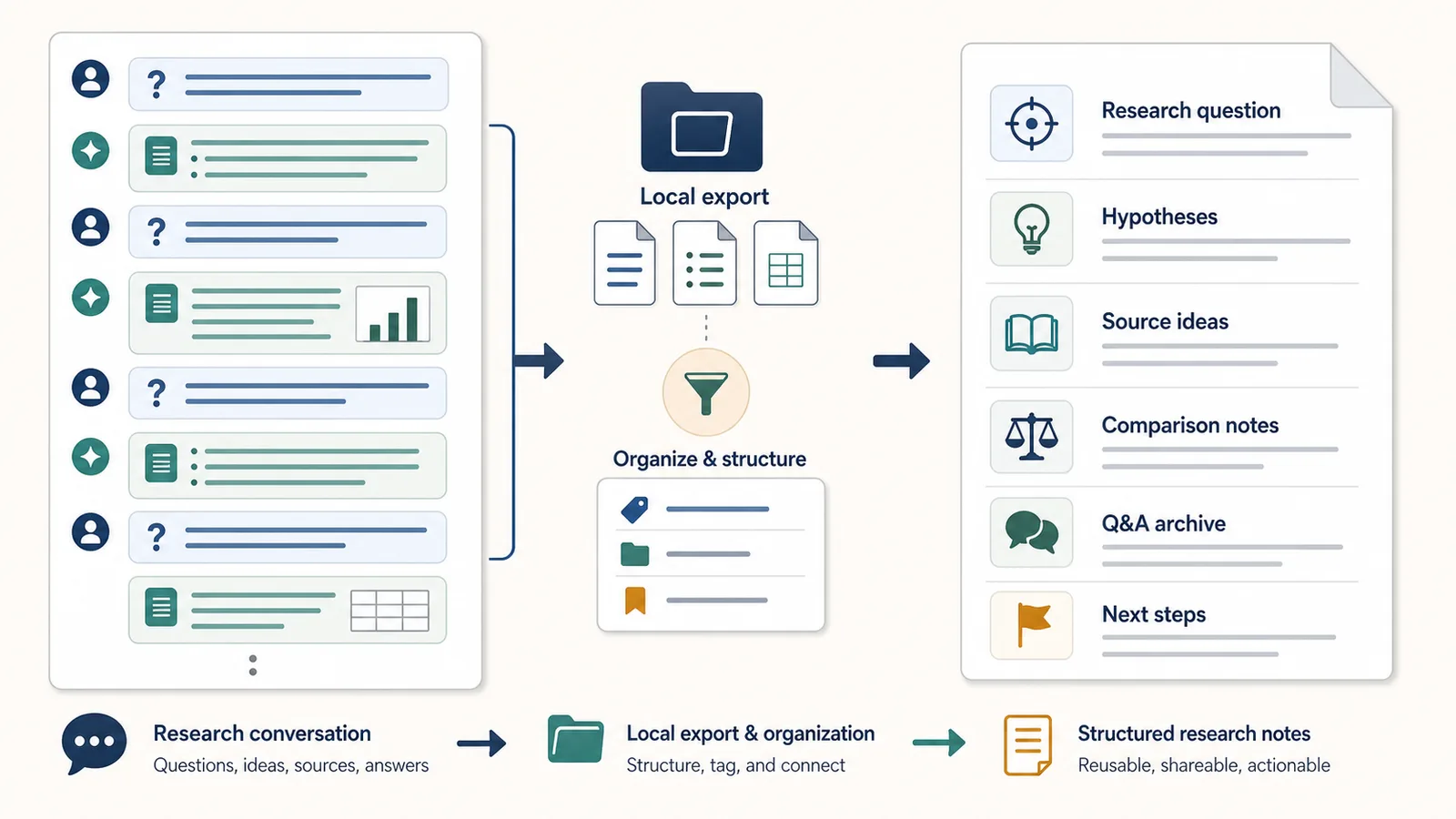
Why researchers need structured notes
Research conversations with ChatGPT can become long quickly.
You may start with one question, then ask for definitions, comparisons, counterarguments, examples, source ideas, frameworks, summaries, or next steps.
In the moment, the thread makes sense.
Later, it may be hard to understand:
- what the original research question was;
- which answer was useful;
- which claims still need verification;
- which hypotheses were rejected;
- which source ideas were worth checking;
- what decision was made;
- what should happen next.
This is why researchers should not treat ChatGPT conversations as disposable chat logs.
If a conversation contains useful thinking, it should become structured research notes.
The problem with raw research transcripts
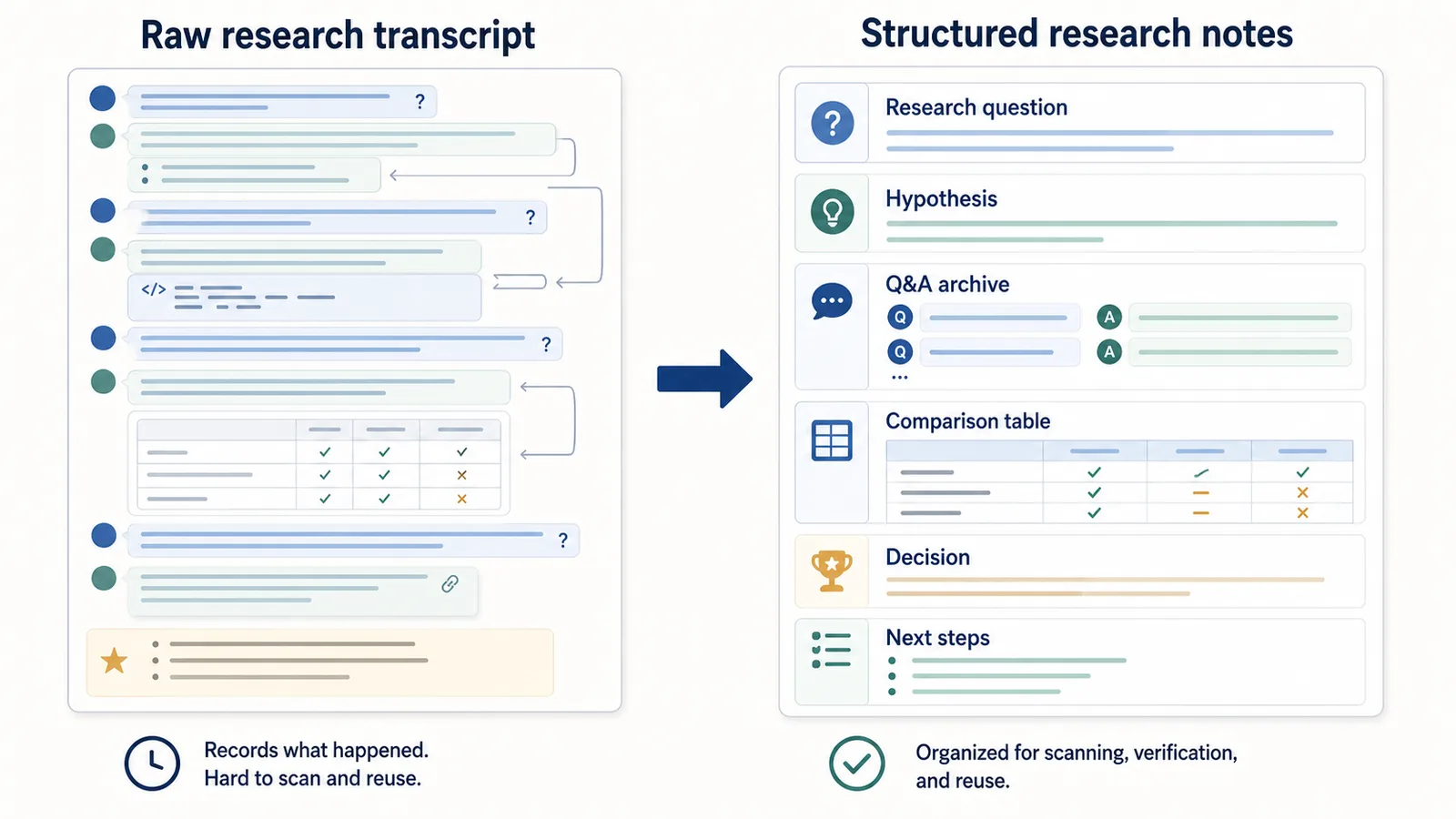
A raw transcript preserves the conversation in order.
That sounds useful, but it often becomes difficult to reuse.
A long research transcript may include:
- several versions of the same question;
- broad exploratory answers;
- source ideas mixed with assumptions;
- unverified claims;
- comparison tables;
- short follow-up prompts;
- partial conclusions;
- side topics;
- abandoned directions;
- final next steps hidden at the end.
The problem is not that the transcript is useless.
The problem is that it does not make the research easy to scan.
A raw transcript answers:
What happened in the chat?
Structured research notes answer:
What did I investigate, what did I learn, what needs verification, and what should I do next?
What structured ChatGPT research notes should include
A useful research note should preserve both the content and the research path.
At minimum, include:
| Section | What it captures |
|---|---|
| Research question | The main question or topic |
| Context | Why the question matters |
| Prompts | What you asked ChatGPT |
| Answers | What ChatGPT replied |
| Hypotheses | Possible explanations or directions |
| Source ideas | Sources, terms, authors, papers, datasets, or topics to verify |
| Comparison notes | Differences between options, concepts, tools, or arguments |
| Decisions | What you accepted, rejected, or chose |
| Open questions | What still needs checking |
| Next steps | What to research or do next |
This structure turns a chat into something closer to a research log.
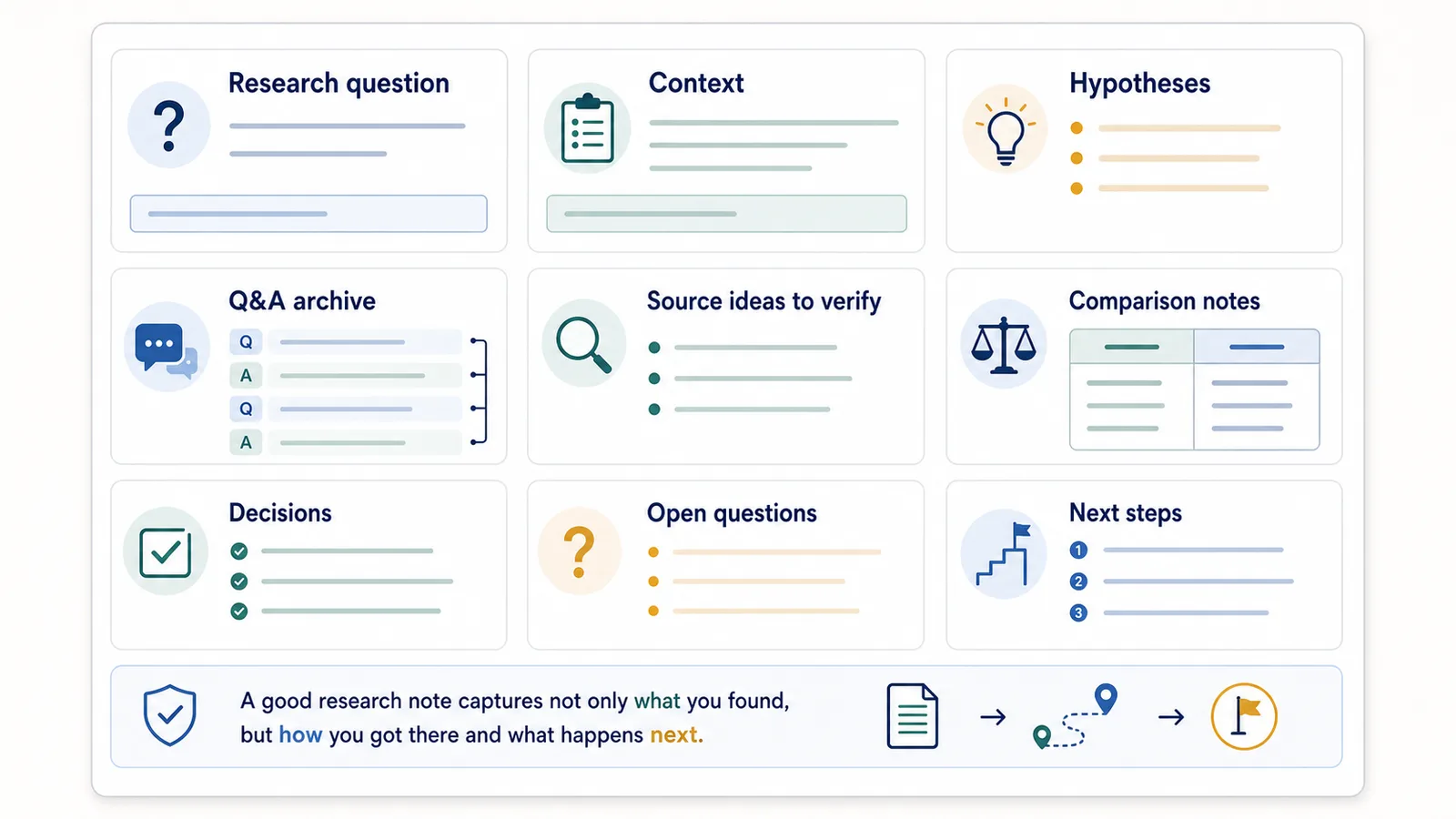
Start with the research question
Every useful research note should start with the research question.
Without it, the saved conversation becomes hard to interpret later.
Bad title:
ChatGPT notes
Better title:
Research question: What makes long ChatGPT conversations hard to reuse later?
Even better:
2026-06-13 — Research question: How do users save and reuse long ChatGPT conversations?
A clear research question helps you understand:
- why the conversation exists;
- what the answers were trying to solve;
- which parts are relevant;
- how to reuse the notes later.
Preserve prompts and answers together
ChatGPT answers depend on prompts.
If you save only the assistant’s answers, you may lose the context that made those answers meaningful.
For research, this is especially important because a prompt may include:
- scope;
- assumptions;
- constraints;
- audience;
- definitions;
- comparison criteria;
- prior findings;
- source requirements;
- excluded topics.
A Q&A structure keeps that context visible.
Example:
Q1: What are the main risks of using browser extensions to export ChatGPT conversations?

A1: The main risks are unclear permissions, hidden backend upload, vague privacy policies, broad access, required login, and sensitive data exposure.

Q2: Which of these risks matter most for a local-first export tool?

A2: The most important risks are whether conversation content stays local, whether permissions match the task, and whether the privacy policy clearly explains data handling.
This is much easier to reuse than saving the answers alone.
Save hypotheses separately
Research conversations often generate hypotheses.
A hypothesis is not a conclusion. It is a possible explanation or direction to test.
For example:
Hypothesis:
Users do not only want to save ChatGPT conversations. They want to reuse them later as searchable notes.
That should be marked clearly.
Do not let hypotheses get buried inside the transcript.
A good research note can separate:
| Type | Example |
|---|---|
| Question | Why are long ChatGPT chats hard to reuse? |
| Hypothesis | Because users lose prompt-answer structure after export |
| Evidence needed | Search queries, user interviews, product usage, support requests |
| Next step | Write a page about Q&A export and track GSC queries |
This makes the note useful for future research and decision-making.
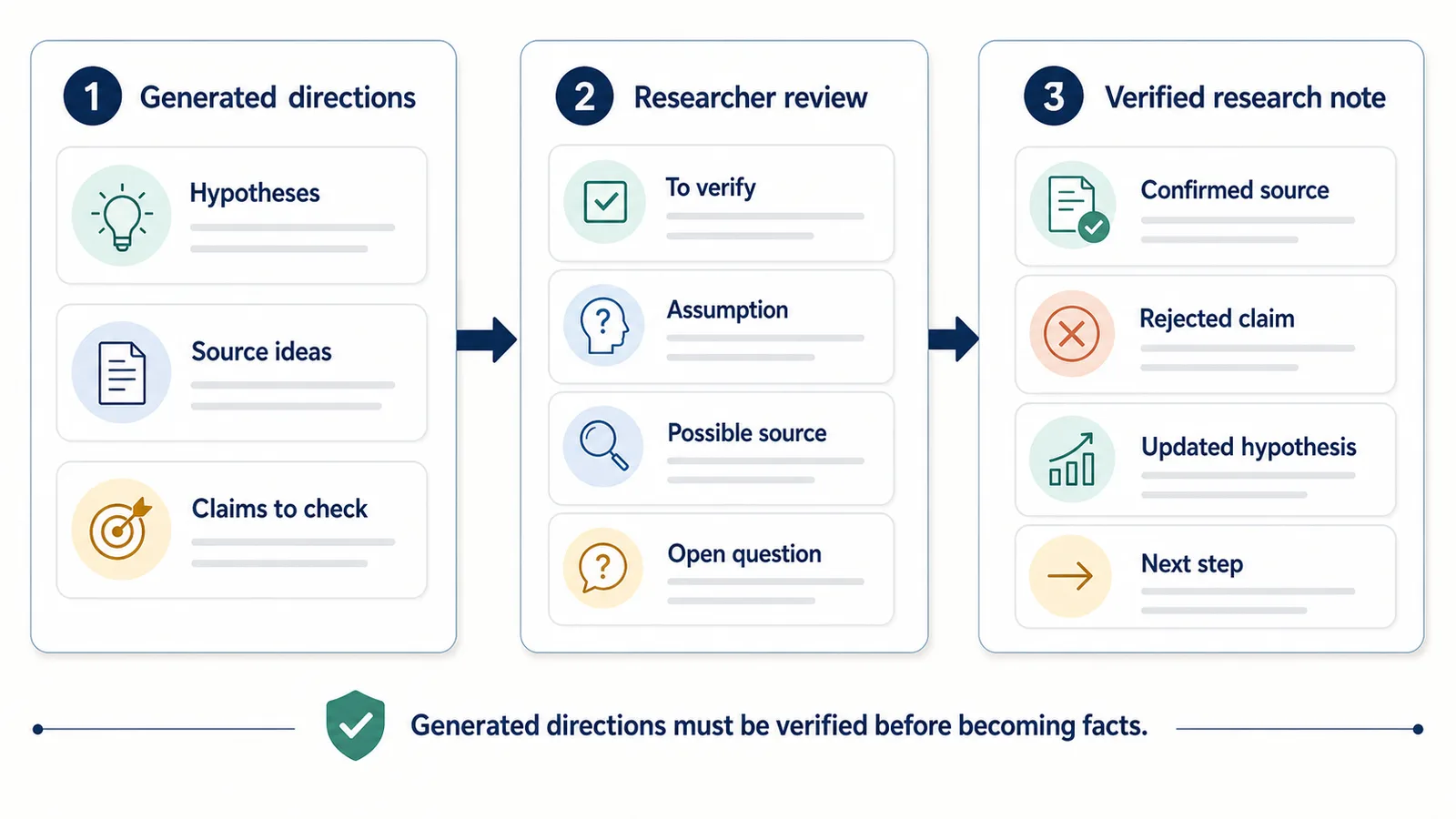
Save source ideas as ideas, not facts
ChatGPT can suggest sources, keywords, authors, datasets, topics, or search directions.
Those can be useful, but they should not be treated as verified facts.
In structured notes, create a separate section:
Source ideas to verify:
- Google Search Console documentation on indexing
- Chrome extension documentation on permissions
- User discussions about exporting long ChatGPT conversations
- Competing tools and their privacy models
This keeps source ideas useful without overclaiming.
A good research note should distinguish between:
- verified sources;
- source ideas;
- claims to check;
- assumptions;
- your own decisions.
Use comparison notes
Research often involves comparing options.
ChatGPT is useful for producing early comparison frameworks, but those comparisons can get lost in a long thread.
Save comparison notes separately.
Example:
| Option | Good for | Limitation |
|---|---|---|
| Raw transcript | Complete conversation record | Hard to scan |
| Summary | Fast review | Removes details |
| Q&A notes | Reusable structure | Less visual than PDF |
| Reading and sharing | Harder to edit | |
| JSON | Automation | Not human-friendly |
Comparison notes are useful because they often become:
- article sections;
- decision memos;
- product requirements;
- research summaries;
- future prompts;
- internal documentation.
If a comparison matters, do not leave it buried in the chat.
Keep a research log
A research log is a record of what you investigated and what you learned.
It does not need to be complicated.
A simple research log can look like this:
Date: 2026-06-13
Topic: ChatGPT export formats
Research question: Which format is best for reusable ChatGPT notes?

Prompts asked:
- Compare TXT, Markdown, PDF, and JSON for ChatGPT export.
- Which format is best for Q&A notes?
- When is PDF better than TXT?

Useful findings:
- TXT and Markdown are best for editable reusable notes.
- PDF is better for reading and sharing.
- JSON is best for automation.

Claims to verify:
- Current Chrome extension permission descriptions.
- OpenAI data export behavior.

Decision:
Write a format comparison page and position Session Saver as TXT-first.

Next step:
Create a privacy/safety page about ChatGPT export extensions.
This structure turns a chat into a reusable research asset.
Create a Q&A archive
A Q&A archive is a saved collection of research conversations where each useful prompt is paired with the answer it produced.
This is helpful because research is often not linear.
You may want to return later to a specific question:
- What were the risks?
- Which format was best?
- What source ideas were suggested?
- What comparison criteria did we use?
- What did we decide?
- Which assumptions still need testing?
A Q&A archive makes this easier.
Instead of scanning a wall of text, you can search for the question.
Related guide: How to Export ChatGPT Conversations as Question-Answer Pairs
Example: messy research thread vs structured notes
A messy research thread might look like this:
User: Research ChatGPT export tools.
Assistant: Here are several categories...
User: Focus on long chats.
Assistant: Long chats create problems with scrolling, context, and reuse...
User: What about formats?
Assistant: TXT, Markdown, PDF, and JSON solve different jobs...
User: Make this into clusters.
Assistant: Here is a possible topical map...
User: Which article next?
Assistant: Start with Q&A export and privacy...
This is understandable while you are working.
Later, it is better as structured research notes:
Research question:
How should a site explain ChatGPT export workflows?

Hypothesis:
The strongest angle is not "download chat" but "reuse long conversations as structured notes."

Q1: What problems do long chats create?
A1: Scrolling, missed context, messy transcripts, unclear final versions, and weak reuse.

Q2: What format comparison matters?
A2: TXT is best for simple reusable notes, Markdown for structured notes, PDF for reading, JSON for automation.

Q3: What content cluster should come next?
A3: Q&A export, privacy/safety, permissions, formats, and technical trust.

Decision:
Build the site as a practical knowledge base around ChatGPT export, not a generic extension landing page.
The structured version is easier to reuse.
When to save a research conversation
Not every ChatGPT research session needs to be saved.
Save the conversation when it includes:
- a useful research question;
- a strong hypothesis;
- source ideas to verify;
- a comparison table;
- product or content decisions;
- a reusable framework;
- a research log;
- a draft that may be reused;
- a technical explanation;
- next steps.
Do not over-archive temporary chats.
If the conversation helped you think through something important, save it.
If it was a quick disposable answer, copy the result and move on.
Best formats for ChatGPT research notes
For research notes, the best formats are usually TXT or Markdown.
| Format | Good for research? | Why |
|---|---|---|
| TXT | Yes | Simple, searchable, editable, durable |
| Markdown | Yes | Better for headings, sections, code, and notes apps |
| Sometimes | Good for reading or sharing a finished research note | |
| JSON | Sometimes | Useful for automation or structured data workflows |
TXT is enough when you want clean local notes.
Markdown is better when the notes should become documentation or part of a personal knowledge base.
PDF is better when the research output is finished and needs to be shared.
JSON is better when the research data needs to be processed by software.
Related guide: TXT vs Markdown vs PDF vs JSON for ChatGPT Export
How to name ChatGPT research exports
Good filenames make research notes easier to find later.
Bad filenames:
chat.txt
research.txt
notes.txt
final.txt
Better filenames:
2026-06-13-chatgpt-export-format-research.txt
2026-06-13-browser-extension-permissions-research.md
2026-06-13-ai-seo-topic-cluster-notes.txt
A useful filename includes:
- date;
- research topic;
- project;
- format or purpose.
This is simple, but it matters when your archive grows.
How to organize research exports
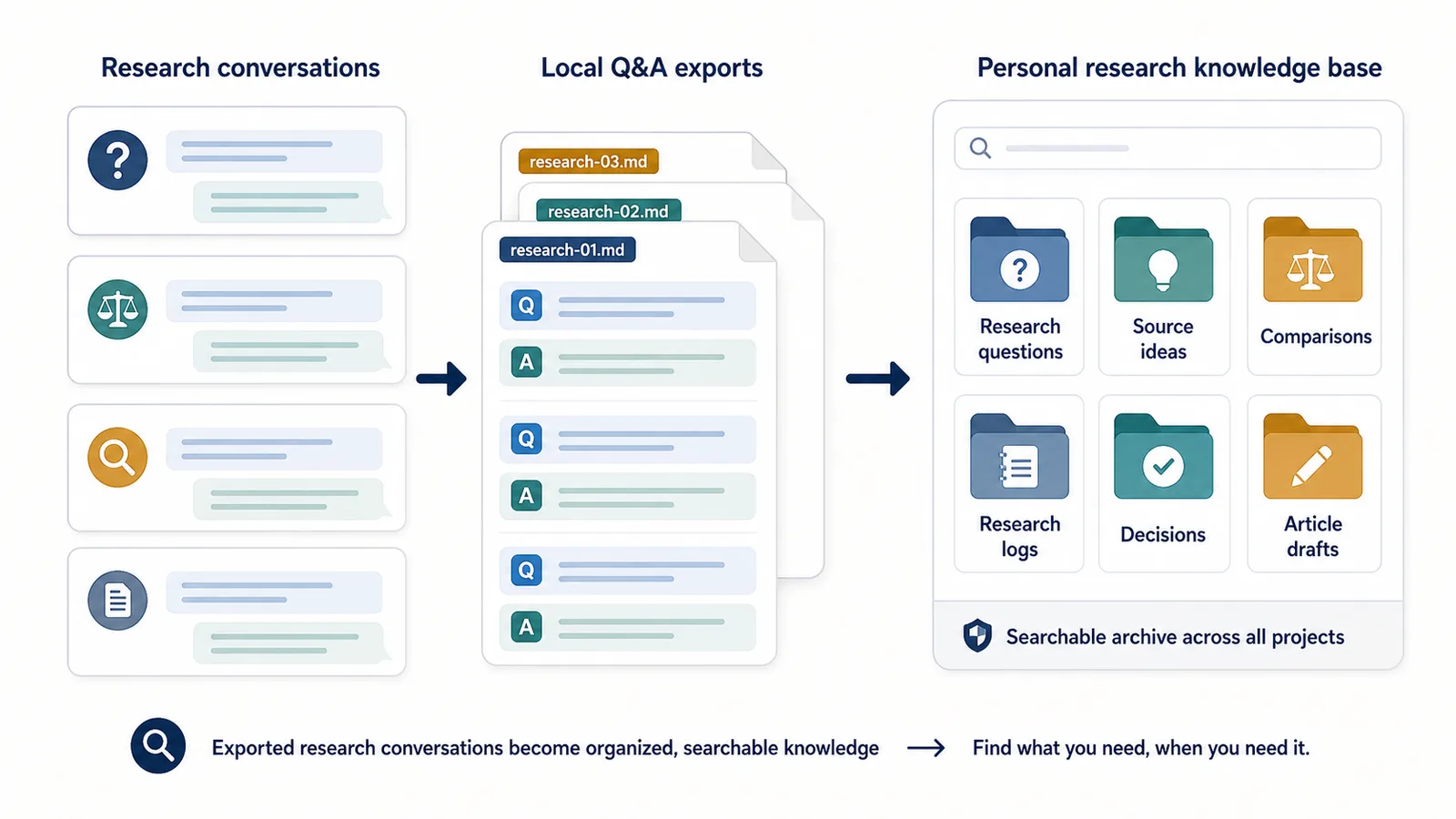
You can organize ChatGPT research notes in folders, a notes app, or a personal knowledge base.
Example folder structure:
AI research notes/
  Product research/
  SEO research/
  Technical research/
  Source ideas/
  Article drafts/
  Comparisons/
  Research logs/
Another option:
Project/
  01-research-questions/
  02-source-ideas/
  03-comparisons/
  04-chatgpt-qa-archive/
  05-decisions/
The exact system matters less than consistency.
The goal is to make useful research findable.
What to verify outside ChatGPT
ChatGPT can help with research structure, but it should not be the only source of truth.
After saving a research conversation, verify:
- factual claims;
- dates;
- statistics;
- legal or policy details;
- medical or financial claims;
- product features;
- pricing;
- source names;
- direct quotes;
- technical documentation;
- anything that may have changed recently.
Structured notes make this easier because you can mark which claims need verification.
Example:
Claims to verify:
- Does this browser permission work this way in current Chrome docs?
- Does this official product feature still exist?
- Is this pricing current?
- Is this source real and relevant?
A good research workflow separates idea generation from verification.
Research note template
You can use this simple template for saving ChatGPT research sessions:
# Research note title

Date:
Project:
Topic:

## Research question

What am I trying to understand?

## Context

Why does this research matter?

## Hypotheses

- Hypothesis 1
- Hypothesis 2

## Q&A archive

Q1:
A1:

Q2:
A2:

Q3:
A3:

## Source ideas to verify

- Source idea 1
- Source idea 2
- Source idea 3

## Comparison notes

| Option | Strength | Weakness |
|---|---|---|
| Option A | ... | ... |
| Option B | ... | ... |

## Decisions

- Decision 1
- Decision 2

## Open questions

- Question 1
- Question 2

## Next steps

- Step 1
- Step 2
This template is simple enough to reuse across many research sessions.
How ChatGPT Session Saver helps
ChatGPT Session Saver is a local-first browser tool for saving one active ChatGPT conversation as clean Q&A-style TXT notes.
For researchers, it can preserve one useful research session as a local Q&A archive.
It does not verify sources, classify hypotheses, distinguish facts from assumptions, or automatically build the research-note sections shown above. Researchers add labels such as “Source ideas to verify,” “Decisions,” and “Next steps” manually after export.
It is useful when you want to preserve:
- the original research questions;
- follow-up prompts;
- assistant answers;
- Q&A structure;
- a local TXT file;
- a searchable research note.
It is not:
- a source verification tool;
- a citation manager;
- a full account backup;
- a PDF-first exporter;
- a JSON automation product;
- a replacement for checking sources.
Use ChatGPT Session Saver when one active research conversation should become clean local Q&A notes.
When not to use an export tool
You do not always need an export tool.
Manual notes may be better when:
- the chat is short;
- only one answer matters;
- the conversation contains sensitive information;
- you only need a short summary;
- the final research output is already saved elsewhere;
- you need to heavily rewrite the notes anyway.
For important long research conversations, structured export is more useful.
For short or sensitive chats, manual selection may be enough.
Common mistakes
Avoid these mistakes when saving ChatGPT research conversations:
- saving only final answers;
- losing the original research question;
- treating source ideas as verified sources;
- mixing unrelated research topics in one file;
- failing to mark hypotheses separately;
- burying decisions in a raw transcript;
- using unclear filenames;
- relying on PDF when you need editable notes;
- saving everything without reviewing what is actually useful;
- forgetting to verify claims outside ChatGPT.
A good research archive should help you think better later, not just store more text.
Part of the ChatGPT Export Guides
This guide is part of a practical series about saving, exporting, structuring, and reusing ChatGPT conversations.
FAQ
How can researchers save ChatGPT conversations as structured notes?
Researchers can save ChatGPT conversations by preserving the original research question, hypotheses, source ideas, comparison notes, follow-up prompts, and assistant answers in a structured Q&A format.
Why are raw ChatGPT transcripts hard to use for research?
Raw transcripts can become long, messy, and difficult to scan. They often bury the original research question, assumptions, source ideas, and conclusions inside a chronological wall of text.
Should researchers save ChatGPT answers without the prompts?
Usually no. ChatGPT answers depend on the prompt, constraints, and follow-up questions. Saving answers without prompts can remove the context that makes the answer useful later.
Can ChatGPT replace research sources?
No. ChatGPT conversations can help organize thinking, generate questions, compare ideas, and create research notes, but claims and source suggestions should be verified with reliable external sources.
What format is best for saving ChatGPT research notes?
TXT and Markdown are usually best for reusable research notes because they are searchable, editable, and easy to store in folders, notes apps, or a personal knowledge base.
What should a ChatGPT research log include?
A research log should include the research question, date, topic, prompts, answers, hypotheses, source ideas, comparisons, decisions, and next steps.
How does Q&A structure help researchers?
Q&A structure keeps each assistant answer connected to the research question or follow-up prompt that produced it. This makes the notes easier to understand, verify, and reuse later.
Is PDF good for saving ChatGPT research sessions?
PDF is useful for reading and sharing a finished research conversation, but TXT or Markdown is usually better when the notes need to be edited, searched, verified, or reused.
Final thought
For researchers, a ChatGPT conversation is not just a chat.
It can be a record of questions, hypotheses, source ideas, comparisons, decisions, and next steps.
If you save only the final answer, you may lose the research path.
If you save the conversation as structured Q&A notes, it becomes easier to verify, reuse, and turn into a real research archive.