Why ChatGPT Export Extensions Break When OpenAI Updates the Interface
Quick answer
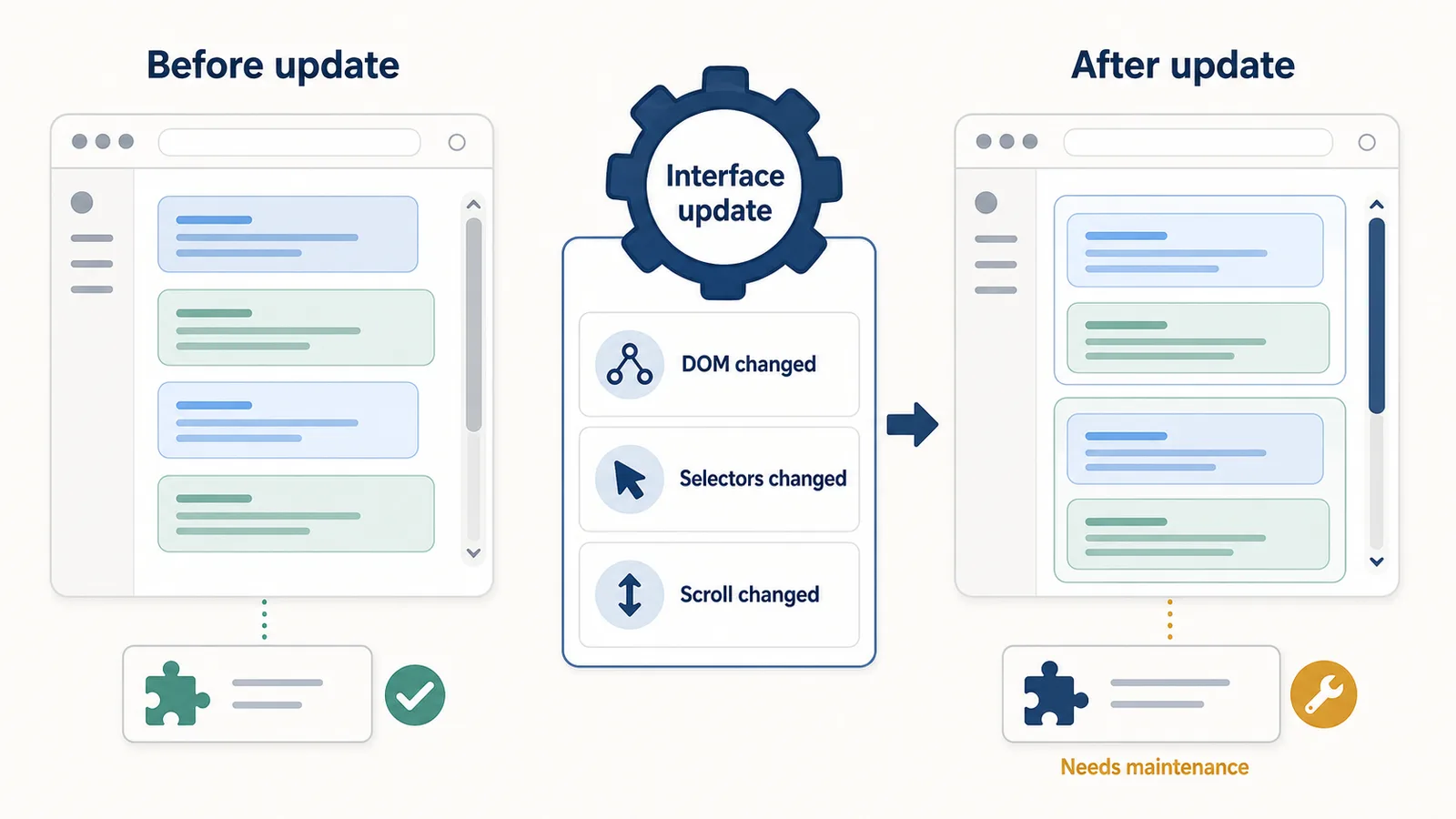
ChatGPT export extensions can break when the ChatGPT interface changes.
A browser extension that exports a conversation usually depends on the structure of the active page. If that structure changes, the extension may no longer find messages correctly.
Common reasons include:
- UI changes;
- changed DOM structure;
- changed selectors;
- lazy-loaded or virtualized content;
- different scrolling behavior;
- new message containers;
- changed code block rendering;
- changed table rendering;
- timing issues while the page loads.
This does not automatically mean the extension is unsafe or poorly made.
It often means the page changed and the extension needs to adapt.
Difference in one sentence: ChatGPT export extensions break because they read a living web interface, not a fixed file format.
Why this matters
Exporting a ChatGPT conversation sounds simple.
You might expect the browser extension to just “read the chat” and save it.
But the page is not a plain text document.
A ChatGPT conversation is rendered inside a dynamic web interface. The extension has to identify which parts of that interface are the actual conversation and which parts are buttons, menus, labels, navigation, hidden elements, or temporary UI.
That makes reliable extraction harder than basic copy-paste.
For short conversations, the task may look easy.
For long conversations, code-heavy conversations, research sessions, or chats with many follow-ups, the extraction logic becomes much more delicate.
How export extensions usually read a ChatGPT page
A ChatGPT export extension usually works by reading the active page in the browser.
The simplified flow looks like this:
Active ChatGPT page
→ extension runs a content script
→ content script reads the DOM
→ extension finds messages
→ extension formats the conversation
→ user saves or copies the export
This workflow depends on the page structure.
If the structure changes, the extension may still run, but it may fail to find the right elements.
Related guide: How Browser Extensions Read an Active ChatGPT Page
What is the DOM?
The DOM is the browser’s structured representation of a web page.
It contains page elements such as:
- message containers;
- text blocks;
- buttons;
- links;
- code blocks;
- tables;
- headings;
- input areas;
- sidebars;
- hidden elements.
A browser extension can inspect the DOM to find conversation messages.
But the DOM is not guaranteed to stay the same forever.
If the ChatGPT interface changes, the DOM structure can change too.
That can break extraction logic.
Why DOM structure changes break extensions
An export extension needs to know where the conversation messages are.
For example, it may expect the page to have:
- one container per message;
- a marker that identifies user messages;
- a marker that identifies assistant messages;
- a stable order of message elements;
- consistent containers for code blocks;
- predictable text extraction behavior.
If any of those assumptions change, the extension may extract the wrong content.
Possible failures include:
- missing user prompts;
- missing assistant answers;
- duplicated messages;
- broken message order;
- code blocks copied incorrectly;
- tables flattened into unreadable text;
- sidebar text included by mistake;
- empty outputs;
- partial exports.
The extension may not be broken as an app.
It may be broken because the map it used to read the page is no longer accurate.
What are selectors?
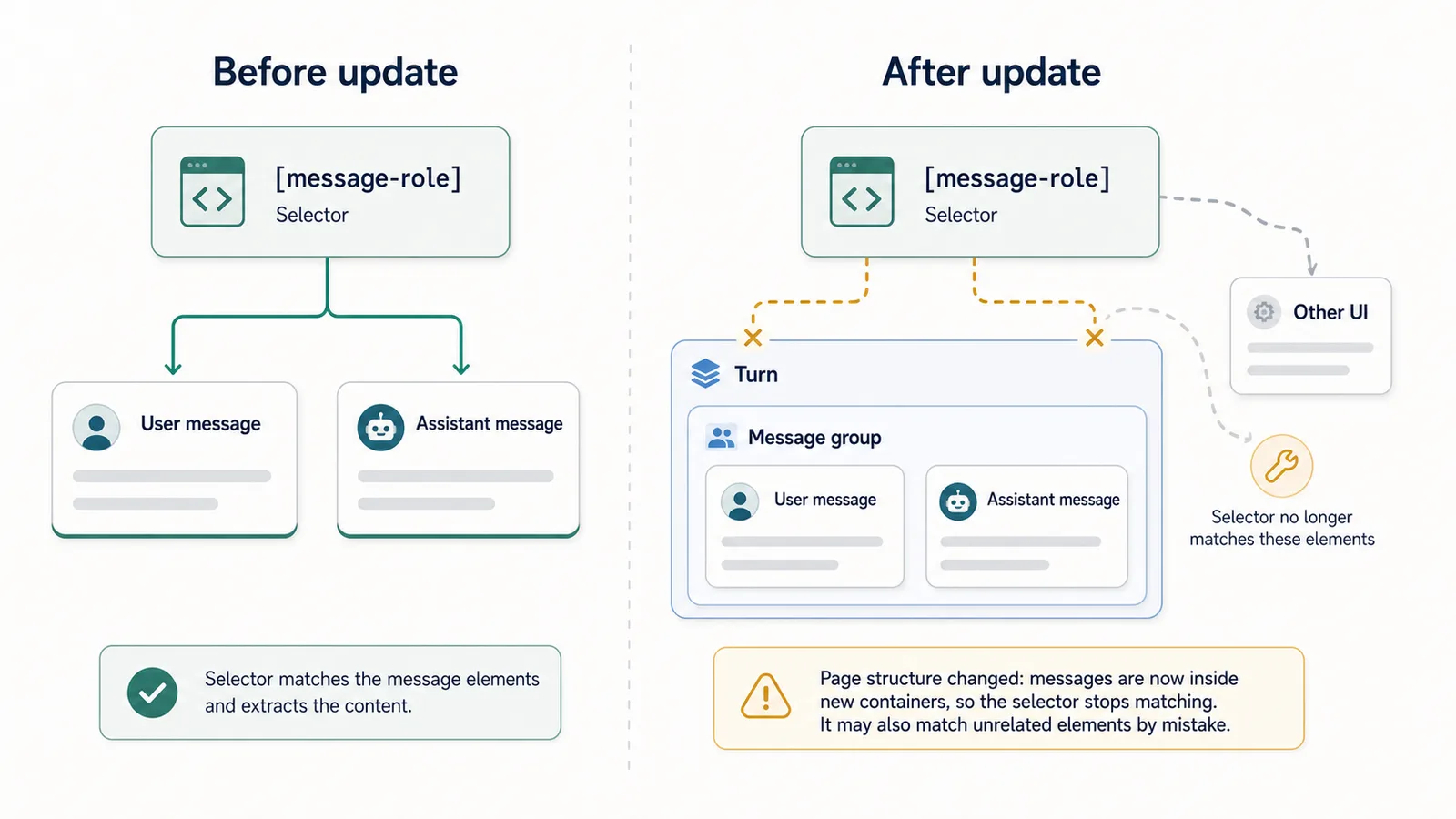
A selector is a pattern used to find elements on a web page.
For example, an extension might look for elements that represent messages.
A simplified example:
const messages = document.querySelectorAll("[data-message-author-role]");
This is only a conceptual example.
The idea is:
find the elements that look like conversation messages.
If the page uses a different attribute, class name, container, or hierarchy after an update, the selector may stop working.
The extension might then find nothing, or worse, find the wrong thing.
Why class names and attributes are fragile
Some page structures are more stable than others.
An extension may depend on:
- HTML tags;
- class names;
- data attributes;
- ARIA labels;
- element hierarchy;
- text markers;
- message order;
- layout containers.
Class names can be especially fragile if they are generated by a frontend build system or changed during redesigns.
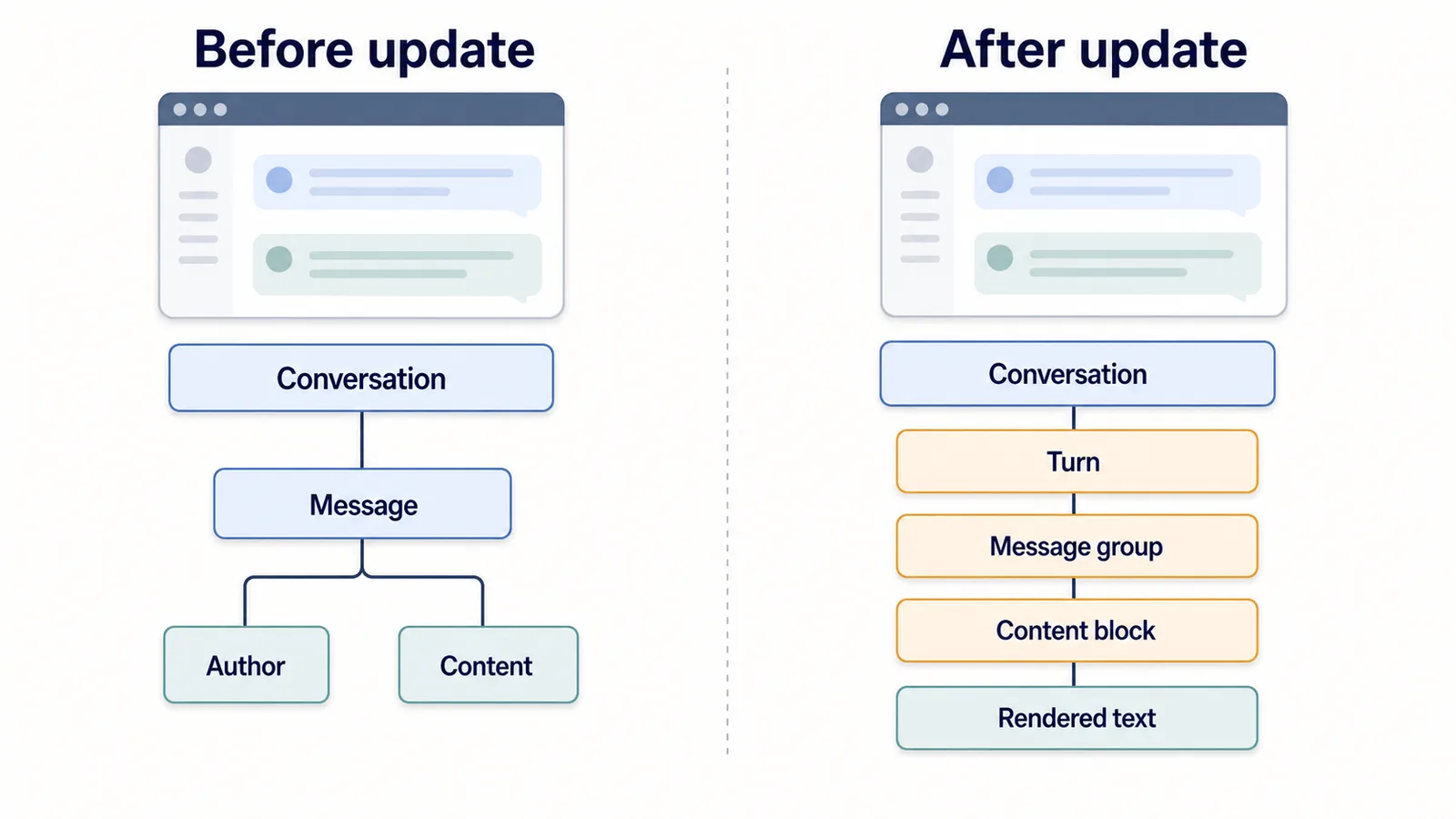
A small-looking UI change can create a large DOM change.
For example:
Old structure:
conversation → message → author → content

New structure:
conversation → turn → message group → content block → rendered text
To the user, the page may look almost the same.
To the extension, it may be a different structure.
Why UI updates can break extraction
A UI update can change more than visuals.
It may change:
- where messages are stored in the DOM;
- how user and assistant messages are labeled;
- how code blocks render;
- how tables render;
- how markdown is converted to HTML;
- how long conversations load;
- how scrolling works;
- how regenerated answers are represented;
- how hidden or collapsed content behaves.
This is why export extensions need maintenance.
They are reading a live product interface, not a stable export API.
Virtualized and lazy-loaded content
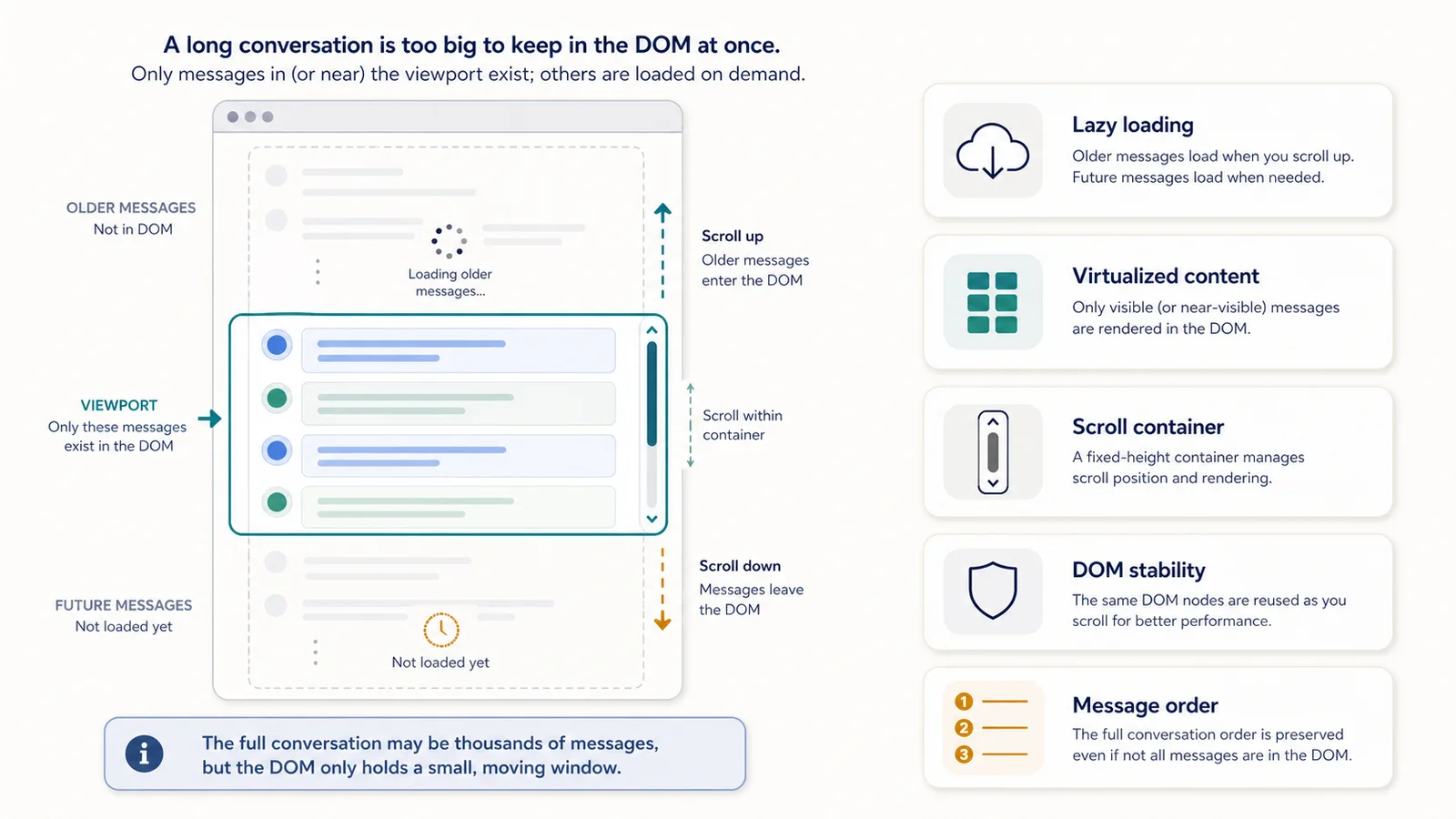
Long conversations can be difficult because the page may not render every message in the DOM at the same time.
Some web interfaces use lazy loading or virtualization patterns.
In plain English:
The page may only load or keep part of the conversation visible at once.
As you scroll, older or newer content may appear, disappear, or change.
For export tools, this creates several problems:
- not all messages may be present at once;
- scrolling may be required to load earlier content;
- the DOM can change while extraction is running;
- message order can be difficult to confirm;
- duplicated snapshots can appear;
- extraction may finish before the page fully loads.
This is one reason long-chat export is harder than exporting short conversations.
Scrolling behavior changes
Scrolling sounds simple, but it is one of the hardest parts of long-chat export.
An extension may need to:
- scroll up to load older messages;
- scroll down to confirm order;
- wait for content to render;
- detect when no more messages are loading;
- avoid duplicate extraction;
- preserve the final sequence.
If the page changes its scrolling behavior, the export logic can break.
Examples:
| Change | Possible result |
|---|---|
| Different scroll container | Extension scrolls the wrong element |
| New lazy-loading threshold | Older messages do not load |
| Virtualized message list | Messages disappear from DOM during export |
| Smooth scrolling changes | Timing assumptions fail |
| Layout height changes | Progress estimation becomes inaccurate |
This is why reliable extraction often needs careful scroll and stability logic.
Timing and rendering issues
Modern web pages can update after the first page load.
Messages, code blocks, tables, and UI elements may render asynchronously.
An export extension may need to wait for the page to become stable before extracting content.
If it reads too early, it may capture:
- incomplete messages;
- loading states;
- empty containers;
- partially rendered code;
- missing tables;
- duplicated content.
A simplified approach might wait until the DOM stops changing for a short period.
Conceptually:
Scroll
→ wait for new content
→ check whether DOM is stable
→ extract visible messages
→ continue
This is more complex than copying visible text.
Code blocks and tables add complexity
ChatGPT conversations often contain code blocks and tables.
Those are harder to export cleanly than plain paragraphs.
A good export needs to preserve:
- code indentation;
- line breaks;
- language labels when useful;
- table rows and columns;
- message boundaries;
- surrounding explanation.
If an interface update changes how code blocks or tables are rendered, an export extension may need an update.
Common issues include:
- code copied as one long line;
- indentation lost;
- table columns flattened;
- markdown structure removed;
- copy buttons included by mistake;
- extra labels added to the export.
For developers, researchers, and writers, these details matter.
Why “copy all text” is not enough
A simple export might collect all visible text from the page.
That sounds easy, but it usually creates poor output.
It may include:
- sidebar text;
- button labels;
- navigation items;
- hidden labels;
- repeated UI text;
- prompt suggestions;
- copy buttons;
- timestamps or metadata;
- unrelated page content.
A useful ChatGPT export should preserve the conversation, not the entire interface.
That means the extension must identify:
- user prompts;
- assistant answers;
- order;
- code blocks;
- tables;
- relevant formatting;
- useful message boundaries.
This is why reliable extraction is a product problem, not only a selector problem.
Why reliable long-chat extraction is hard
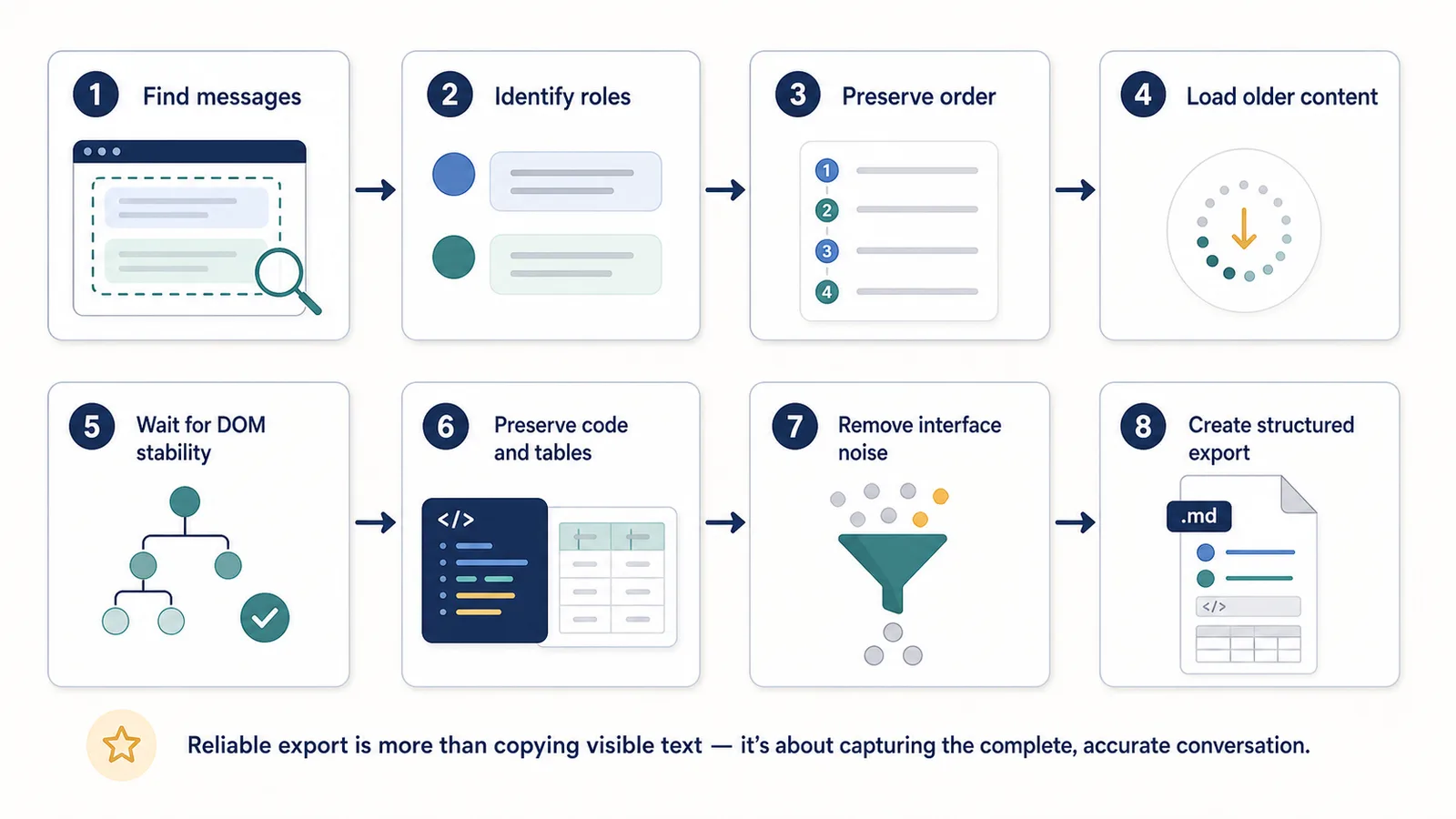
Reliable extraction is hard because the extension has to solve several problems at once:
- Find the right message elements.
- Distinguish user prompts from assistant answers.
- Preserve message order.
- Avoid unrelated UI text.
- Load older content.
- Handle scrolling.
- Wait for rendering.
- Preserve code blocks.
- Preserve tables.
- Avoid duplicates.
- Detect partial extraction.
- Recover from UI changes.
Each part can fail independently.
That is why a long-chat export tool may work on one conversation and fail on another.
Why updates are normal
If an export extension depends on a changing web interface, updates are normal.
A working extension may need changes when:
- ChatGPT changes layout;
- message rendering changes;
- DOM attributes change;
- scrolling behavior changes;
- code block rendering changes;
- browser extension APIs change;
- Chrome permission behavior changes;
- new ChatGPT features affect the page.
This should not be surprising.
A maintained export extension should expect updates.
The question is not whether it will ever need maintenance.
The question is whether the developer responds to changes and explains limitations honestly.
Broken does not always mean unsafe
If a ChatGPT export extension breaks after an interface update, that does not automatically mean it is unsafe.
Broken extraction usually means:
- messages are not found;
- the wrong content is extracted;
- output is incomplete;
- scrolling logic fails;
- page structure changed.
Safety is a different question.
Safety depends on:
- permissions;
- local vs cloud processing;
- backend upload;
- privacy policy;
- data retention;
- account requirements;
- third-party sharing.
A tool can be temporarily broken but still privacy-respecting.
A tool can also work perfectly but have a privacy model you do not like.
These are separate questions.
Related guide: Is It Safe to Use a ChatGPT Export Extension?
What good extension developers do
Good export extension developers usually try to make extraction more resilient.
They may:
- avoid overly fragile selectors;
- use multiple fallback strategies;
- preserve message order carefully;
- handle long conversations separately;
- wait for DOM stability;
- test with short and long chats;
- handle code blocks and tables;
- detect missing content;
- explain limitations;
- update extraction logic after interface changes.
No approach is perfect.
But a good tool should fail in understandable ways and improve over time.
What users should expect
Users should expect that browser extensions depending on web interfaces may occasionally need updates.
This is especially true for tools that read complex, dynamic pages.
A reasonable expectation is:
- the extension explains what it does;
- it does not overpromise perfect extraction;
- it has a clear privacy model;
- it is updated when needed;
- it gives useful output for supported workflows;
- it explains known limitations.
A suspicious expectation would be:
This extension will perfectly export every ChatGPT conversation forever, regardless of any interface changes.
That is not realistic.
What to check when an export extension breaks
If your ChatGPT export extension stops working, check:
- did the ChatGPT interface recently change?
- does the extension still have permission to run?
- is the active page fully loaded?
- is the conversation unusually long?
- are older messages loaded?
- does the extension mention known issues?
- is there an update available?
- does the developer provide support or changelog notes?
- does manual copy-paste still work?
- does the issue happen on all conversations or only one?
This helps separate a temporary extraction issue from a broader product problem.
How ChatGPT Session Saver fits
ChatGPT Session Saver is a local-first browser tool for saving one active ChatGPT conversation as clean Q&A-style TXT notes.
Its job is to preserve the thinking trail of one active ChatGPT session: prompts, answers, drafts, decisions, fixes, and useful context.
The current implementation focuses on:
- one active ChatGPT conversation;
- Q&A-style TXT notes;
- local-first processing;
- reusable conversation context;
- avoiding manual copy-paste cleanup.
It is not:
- a full account export tool;
- a cloud backup product;
- a PDF-first exporter;
- a JSON automation tool;
- a bulk historical archive.
Because it reads the active ChatGPT page, it can be affected by interface changes like other active-page export tools.
That is normal for this kind of product.
The important thing is to keep the scope honest, update the extraction logic when needed, and explain limitations clearly.
Review the Session Saver privacy policy before installation.
How this connects to the thinking trail
The reason extraction quality matters is not only file formatting.
A good export should preserve the thinking trail of the conversation.
That may include:
- the original question;
- constraints;
- follow-up prompts;
- rejected ideas;
- attempted fixes;
- comparisons;
- decisions;
- final answer;
- code blocks;
- research notes;
- editorial versions.
If interface changes cause missing messages or broken ordering, the thinking trail can be damaged.
That is why reliable extraction is important.
The goal is not only to “download a chat.”
The goal is to preserve the context that made the conversation useful.
Common misconceptions
”If an extension breaks, it was badly built.”
Not always.
A well-built extension can break when the page it depends on changes.
The better question is whether the extension is maintained and whether the developer explains limitations honestly.
”If the page looks the same, the extension should still work.”
Not necessarily.
The visible interface can look similar while the underlying DOM structure has changed.
”Exporting text is easy.”
Exporting visible text is easy.
Exporting a long conversation with roles, order, code, tables, and context preserved is harder.
”A broken export means my data was uploaded somewhere.”
Not necessarily.
A broken export usually means extraction failed. Data handling depends on the extension’s privacy model.
”A local-first extension never needs updates.”
Local-first describes data handling.
It does not mean the page extraction logic will work forever without maintenance.
Part of the ChatGPT Export Guides
This guide is part of a practical series about saving, exporting, structuring, and reusing ChatGPT conversations.
FAQ
Why do ChatGPT export extensions break?
ChatGPT export extensions can break when the interface changes. If the page structure, message containers, selectors, scrolling behavior, or rendering logic changes, an extension may need an update to extract conversations reliably.
Does an export extension breaking mean it is unsafe?
Not necessarily. A broken export feature usually means the extension can no longer find or process page content correctly. Safety depends on permissions, privacy model, and data handling, not only whether the UI extraction still works.
What is the DOM and why does it matter?
The DOM is the browser’s structured representation of a web page. Export extensions often read the DOM to find user prompts, assistant answers, code blocks, and message order.
What are selectors?
Selectors are patterns used to find elements on a web page. If a website changes class names, attributes, containers, or layout, old selectors may stop matching the right content.
Why are long ChatGPT conversations harder to export?
Long conversations are harder because older messages may load lazily, scrolling can change what is present in the DOM, and the extension must preserve message order, roles, code blocks, and tables.
What is lazy or virtualized content?
Lazy or virtualized content means the page may not keep every message fully rendered in the DOM at the same time. Content can appear, disappear, or load only when the user scrolls.
Are extension updates normal?
Yes. If a browser extension depends on a changing web interface, updates are normal. A maintained extension may need to adjust extraction logic when the website changes.
What should users check when an export extension breaks?
Users should check whether the extension is maintained, whether the issue is acknowledged, whether the page interface recently changed, and whether the extension explains its limitations honestly.
Final thought
ChatGPT export extensions break because they depend on a live, changing web interface.
That is normal.
The important question is not whether an export tool will ever need updates.
The important question is whether it has a clear scope, honest limitations, maintainable extraction logic, and a privacy model users can understand.
A good export tool does not promise that the web interface will never change.
It helps preserve the conversation’s thinking trail as reliably and transparently as possible.