How Students Can Turn ChatGPT Chats into Study Notes
Quick answer
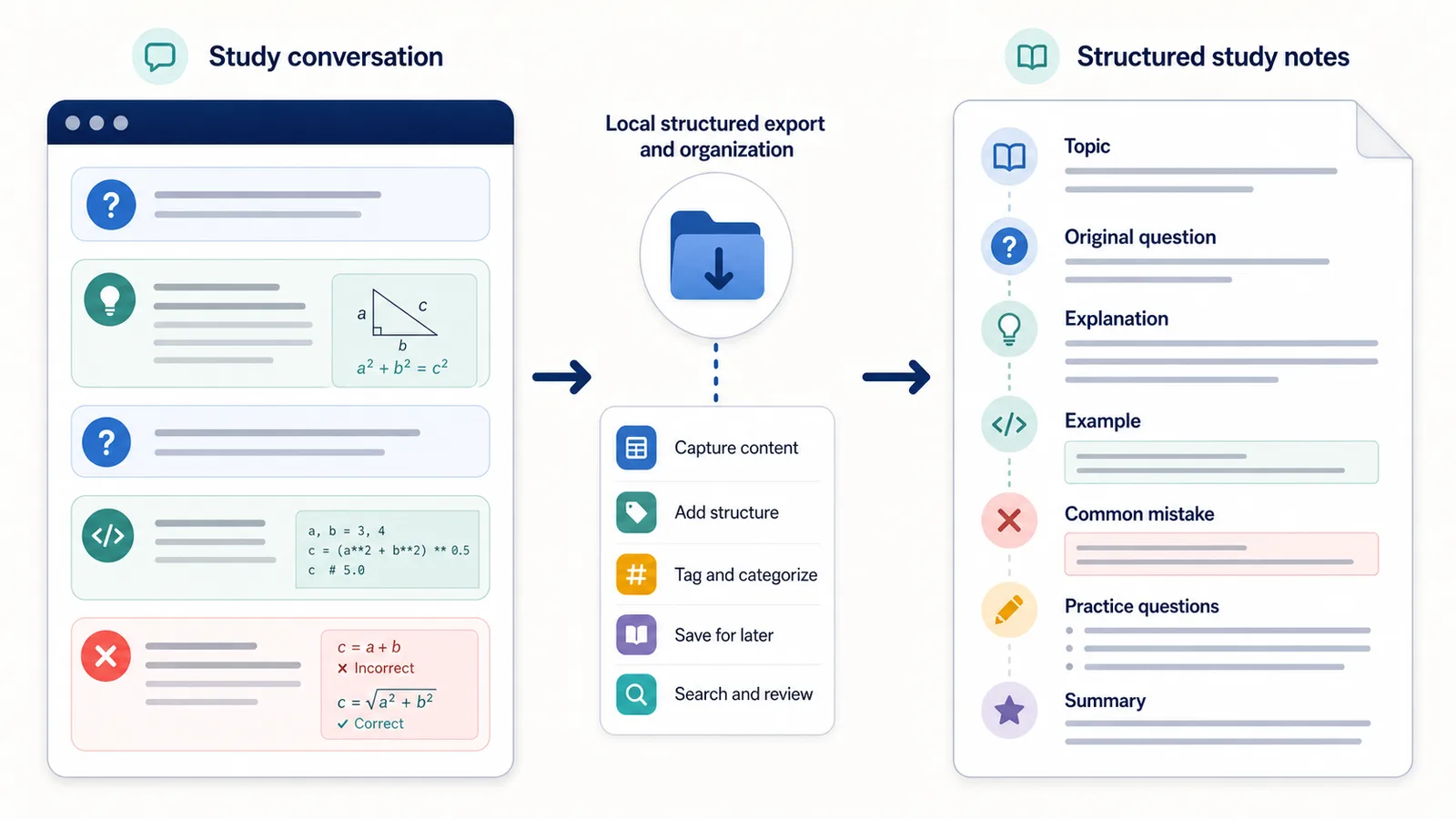
Students can turn ChatGPT chats into study notes by saving the questions they asked, the explanations they received, the examples that helped, the mistakes they corrected, and the final summary of what they learned.
The goal is not to save a messy transcript.
The goal is to turn the conversation into a study resource that is easy to review later.
A useful ChatGPT study note should include:
- the topic;
- the original question;
- the explanation;
- examples;
- step-by-step reasoning;
- corrected mistakes;
- key terms;
- practice questions;
- short summaries;
- a Q&A archive for review.
Difference in one sentence: A ChatGPT chat becomes a study note when it preserves the learning path, not just the final answer.
Why students should save ChatGPT learning conversations
ChatGPT can be useful for studying because it can explain a topic in different ways.
A student might ask:
- “Explain this concept simply.”
- “Give me an example.”
- “Show the steps.”
- “Why is my answer wrong?”
- “Compare these two ideas.”
- “Turn this into practice questions.”
- “Summarize this for revision.”
That conversation can contain a useful learning path.
But if the chat stays as a long thread, it can be hard to reuse later.
The useful explanation may be buried between follow-ups, rewritten answers, mistakes, and side questions.
Structured study notes make the conversation easier to review.
The problem with raw ChatGPT study transcripts
A raw transcript preserves everything in order.
That sounds complete, but it may not be useful for studying.
A long study transcript can include:
- repeated questions;
- long explanations;
- partial answers;
- corrected misunderstandings;
- examples mixed with definitions;
- practice questions buried near the end;
- final summaries mixed with earlier drafts.
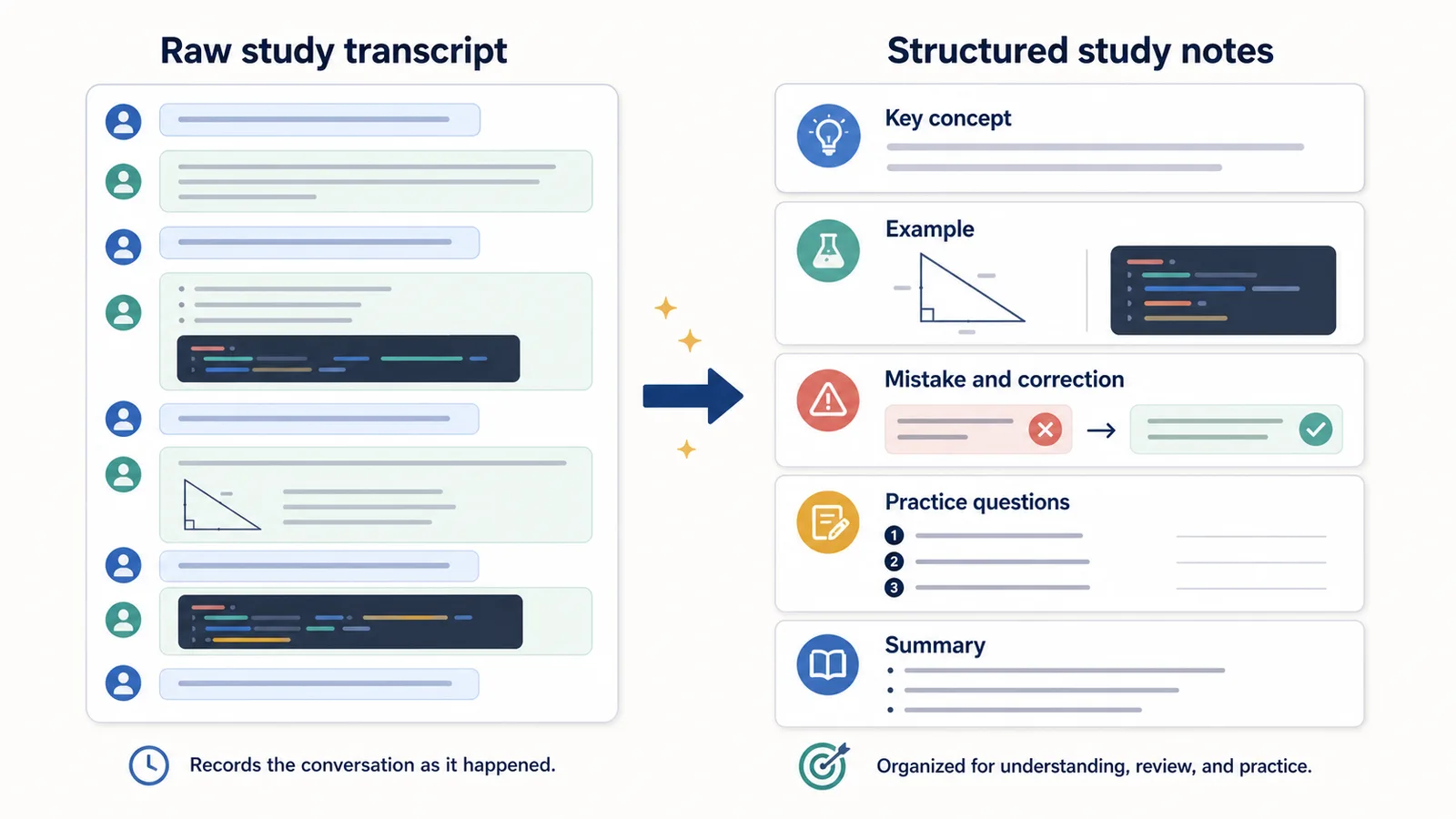
A raw transcript answers:
What happened in the chat?
A study note should answer:
What do I need to understand, remember, and practice?
That is a different structure.
How structured notes can speed up review
Structured notes can make studying faster because they reduce the time spent searching through old chats.
Instead of rereading an entire conversation, a student can jump to:
- the key concept;
- the example that made it clear;
- the mistake they made;
- the corrected explanation;
- the practice questions;
- the final summary.
This does not replace studying.
It makes review more efficient.
The real speed comes from making the useful parts easier to find, repeat, and test.
Chat transcript vs study notes
| Raw ChatGPT transcript | Structured study notes |
|---|---|
| Long chronological conversation | Organized by topic and question |
| Hard to find the main explanation | Key explanation is marked clearly |
| Mistakes may be buried | Mistakes and corrections are saved together |
| Examples are mixed with chat flow | Examples are grouped under the concept |
| Review questions may be hard to find | Practice questions are separated |
| Useful for record keeping | Useful for learning and review |
A raw transcript is a record.
A study note is a learning tool.
What a ChatGPT study note should include
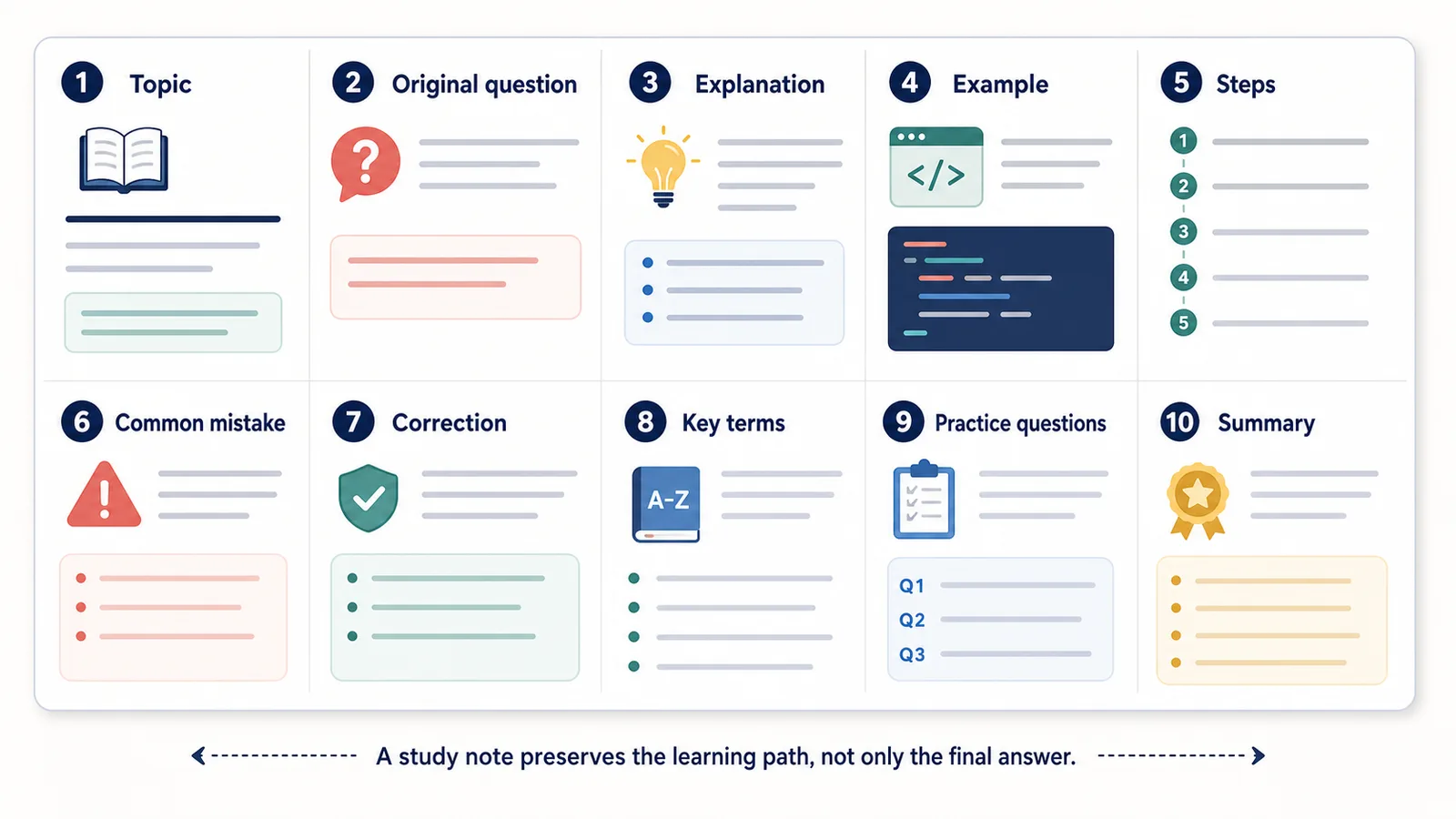
A strong study note should include both the answer and the learning context.
| Section | What it captures |
|---|---|
| Topic | What the note is about |
| Original question | What the student asked |
| Explanation | The main answer |
| Example | A concrete example that makes the idea clearer |
| Steps | The process or reasoning |
| Common mistake | What the student misunderstood |
| Correction | The fixed explanation |
| Key terms | Definitions to remember |
| Practice questions | Questions for review |
| Summary | Short recap |
| Next review | What to study again later |
This turns a ChatGPT conversation into something closer to a study guide.
Preserve the original question
The original question matters.
It explains what the student was trying to understand.
Bad saved note:
Photosynthesis explanation
Better saved note:
Q: Why do plants need sunlight for photosynthesis?

A: Plants use sunlight as the energy source to convert carbon dioxide and water into glucose and oxygen.
The question makes the answer easier to understand later.
Saving only the answer can remove the context that made the explanation useful.
Save explanations in your own structure
ChatGPT may produce long explanations.
A student should not always save the whole answer exactly as-is.
A better study note may turn the explanation into:
- short definition;
- step-by-step process;
- example;
- common mistake;
- review question.
Example:
Topic:
Photosynthesis

Main idea:
Plants use light energy to make glucose from carbon dioxide and water.

Steps:
1. Light is absorbed.
2. Water and carbon dioxide are used.
3. Glucose is produced.
4. Oxygen is released.

Review question:
What are the inputs and outputs of photosynthesis?
This is easier to review than a long paragraph.
Save examples that actually helped
Examples are often the most useful part of a ChatGPT learning chat.
If an explanation finally makes sense because of an example, save that example clearly.
Example:
Useful example:
Think of photosynthesis like a plant making its own food. Sunlight is the energy, carbon dioxide and water are the ingredients, and glucose is the food produced.
Not every example is worth saving.
Keep the examples that made the concept easier to understand.
Save mistakes and corrections
Mistakes are valuable study material.
If ChatGPT helped correct a misunderstanding, save both the mistake and the correction.
Example:
Mistake:
I thought plants get food directly from soil.

Correction:
Plants get minerals and water from soil, but they make glucose through photosynthesis using light energy, carbon dioxide, and water.
This is useful because students often need to remember not only the right answer, but also why the wrong idea was wrong.
A mistake-correction note can be one of the fastest ways to review.
Save step-by-step reasoning
For math, science, programming, grammar, and logic-heavy topics, steps matter.
Do not save only the final result.
Save the process.
Example:
Problem:
Solve 2x + 5 = 13.

Steps:
1. Subtract 5 from both sides: 2x = 8.
2. Divide both sides by 2: x = 4.

Answer:
x = 4.
Step-by-step notes help with practice because they show how to solve similar problems later.
Save key terms and definitions
Many study sessions create useful definitions.
Save them separately.
Example:
Key terms:
- Hypothesis: a testable explanation or prediction.
- Variable: something that can change in an experiment.
- Control group: the group used for comparison.
Definitions are easier to review when they are grouped.
They can also become flashcards later.
Turn ChatGPT answers into practice questions
A good study note should not only explain.
It should help you test yourself.
After a ChatGPT explanation, ask:
Turn this explanation into 5 practice questions.
Then save the questions separately.
Example:
Practice questions:
1. What are the inputs of photosynthesis?
2. What are the outputs of photosynthesis?
3. Why is sunlight necessary?
4. How is glucose used by the plant?
5. What is a common misunderstanding about plant food?
This can make review faster because you are not only rereading.
You are checking whether you remember.
Use Q&A structure for active recall
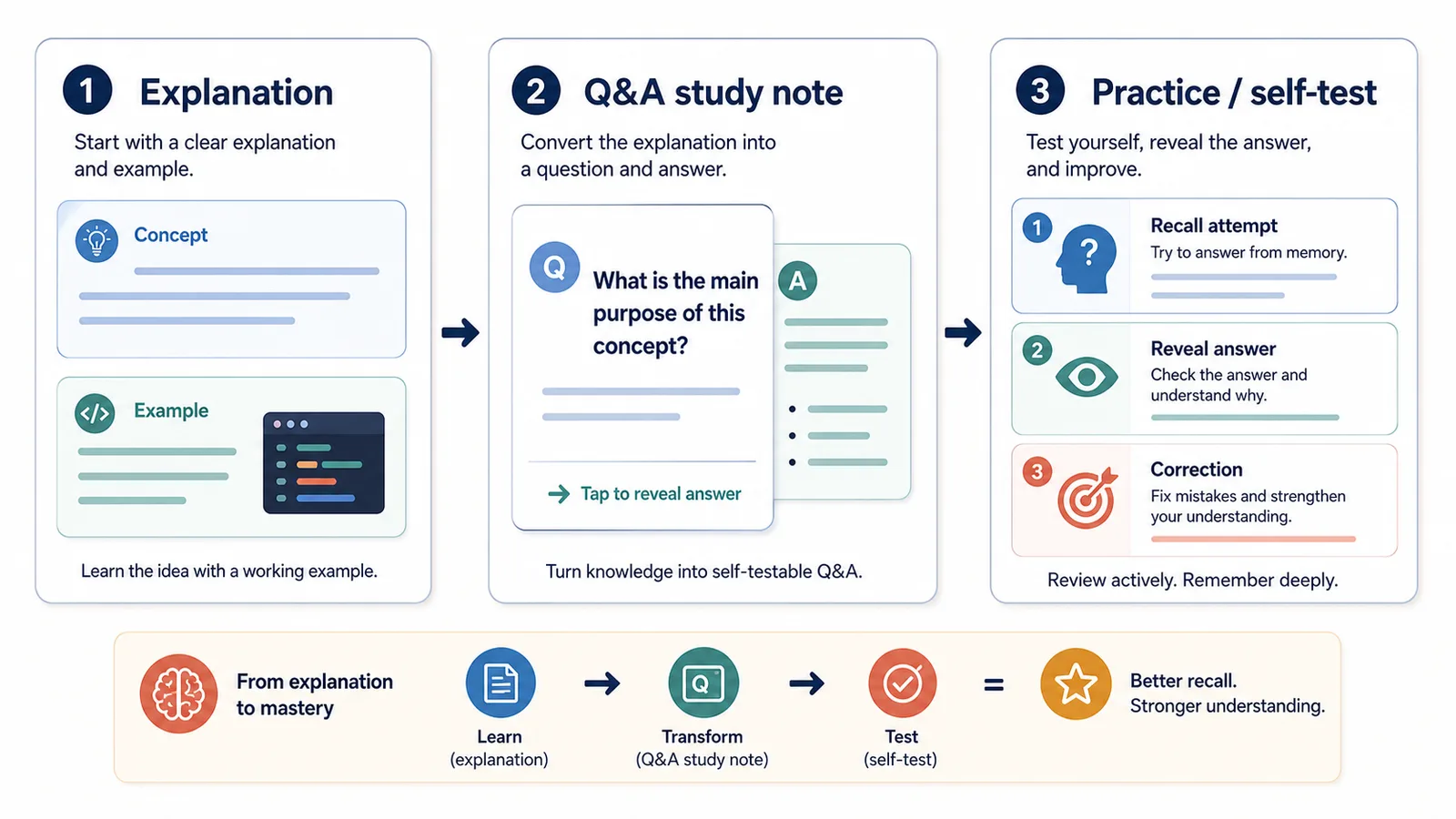
Q&A structure is useful for studying because it naturally supports review.
Instead of reading notes passively, you can cover the answer and try to recall it.
Example:
Q: What is the difference between mitosis and meiosis?

A: Mitosis creates two genetically identical cells for growth and repair. Meiosis creates sex cells with half the number of chromosomes.
The question helps you practice retrieval.
The answer lets you check yourself.
This is why ChatGPT Q&A exports can be useful for study notes.
Related guide: How to Export ChatGPT Conversations as Question-Answer Pairs
Create a Q&A archive by subject
Students can organize saved ChatGPT study notes by subject.
Example folder structure:
Study notes/
  Biology/
  History/
  Math/
  Literature/
  Programming/
  Language learning/
Inside each subject, save notes by topic:
Biology/
  photosynthesis-qa-notes.txt
  cell-division-qa-notes.txt
  genetics-practice-questions.txt
This makes old study sessions easier to find before tests or exams.
Example: messy study chat vs structured notes
A messy ChatGPT study chat might look like this:
User: Explain mitosis.
Assistant: Mitosis is...
User: I don't get the phases.
Assistant: The phases are...
User: What's the difference from meiosis?
Assistant: Mitosis and meiosis differ...
User: Make practice questions.
Assistant: Here are 5 questions...
User: Summarize it.
Assistant: Summary...
A structured study note is easier to review:
Topic:
Mitosis vs meiosis

Main question:
What is the difference between mitosis and meiosis?

Key explanation:
Mitosis creates two identical cells for growth and repair. Meiosis creates sex cells with half the number of chromosomes.

Common mistake:
Confusing meiosis with normal body cell division.

Correction:
Mitosis is for body cells. Meiosis is for sex cells.

Practice questions:
1. What is the purpose of mitosis?
2. What is the purpose of meiosis?
3. How many cells are produced in each process?
4. Are the resulting cells identical?
The structured version is shorter, clearer, and easier to review.
Study note template
Students can use this template for ChatGPT learning conversations:
# Study note title

Date:
Subject:
Topic:
Exam or course:

## Original question

What was I trying to understand?

## Short answer

One or two sentence answer.

## Explanation

Longer explanation in simple language.

## Example

A concrete example that helped.

## Steps or process

1. Step one
2. Step two
3. Step three

## Common mistake

What I misunderstood.

## Correction

The correct idea.

## Key terms

- Term:
- Term:
- Term:

## Practice questions

1. Question
2. Question
3. Question

## Summary

Short recap.

## What to review next

- Topic 1
- Topic 2
This template works for many subjects.
Best formats for ChatGPT study notes
For students, TXT and Markdown are usually the best formats.
| Format | Good for study notes? | Why |
|---|---|---|
| TXT | Yes | Simple, searchable, editable |
| Markdown | Yes | Great for headings, lists, code, and organized notes |
| Sometimes | Useful for reading or sharing finished notes | |
| JSON | Rarely | Useful only for technical automation |
TXT is enough for simple Q&A notes.
Markdown is better when you want headings, sections, examples, and practice questions.
PDF is better for reading a finished study guide.
Related guide: TXT vs Markdown vs PDF vs JSON for ChatGPT Export
How to name study note files
Good filenames help students find notes quickly.
Bad filenames:
chat.txt
study.txt
biology.txt
notes-final.txt
Better filenames:
2026-06-13-biology-photosynthesis-qa-notes.txt
2026-06-13-history-ww2-causes-study-notes.md
2026-06-13-math-linear-equations-practice.md
A useful filename includes:
- date;
- subject;
- topic;
- note type.
This becomes important when your study archive grows.
Use saved chats for exam review
Before an exam, old ChatGPT conversations can be useful if they are structured.
Instead of opening many old chats, review:
- summaries;
- key terms;
- common mistakes;
- practice questions;
- examples;
- Q&A notes.
A good review workflow:
1. Open the topic note.
2. Read the short summary.
3. Cover the answers.
4. Try the practice questions.
5. Check your answers.
6. Review the mistakes section.
7. Mark what still feels unclear.
This is faster than scrolling through a long conversation.
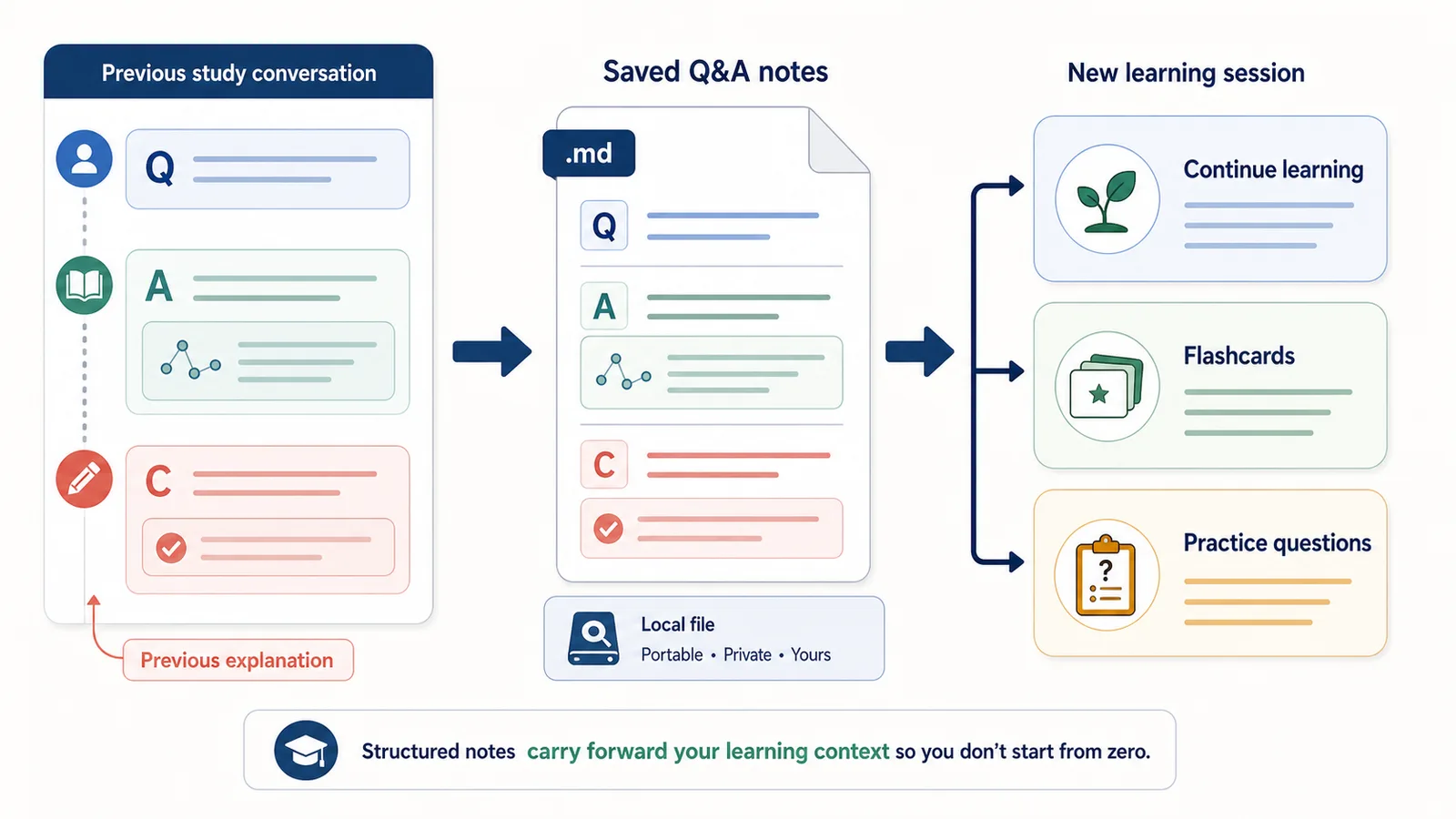
Use saved chats to continue learning later
A structured study note can also help you continue learning later.
For example, you can paste a previous note into a new ChatGPT session and ask:
Here are my previous study notes on photosynthesis. Quiz me on the weak points and explain anything I get wrong.
Or:
Turn these notes into 10 flashcards and 5 harder exam-style questions.
This is where saved notes become portable context.
You are not starting from zero.
You are continuing from your previous learning path.
How ChatGPT Session Saver helps
ChatGPT Session Saver is a local-first browser tool for saving one active ChatGPT conversation as clean Q&A-style TXT notes.
For students, it can preserve the original questions, explanations, examples, corrections, and practice prompts from one active learning session.
It does not automatically identify the key concept, check whether an explanation is correct, create flashcards, choose practice questions, or build the study-note sections shown above. Students organize and verify the exported material manually.
It is useful when you want to preserve:
- original questions;
- explanations;
- examples;
- corrected mistakes;
- practice questions;
- Q&A structure;
- a local TXT archive.
It is not:
- a homework cheating tool;
- a tutor replacement;
- a citation manager;
- a flashcard app;
- a full account backup;
- a PDF-first exporter;
- a JSON automation product.
Use it when one active ChatGPT study conversation should become clean local Q&A notes that you can review later.
When not to export a study chat
You do not always need to export a ChatGPT study conversation.
Do not export the full chat if:
- it was only a quick answer;
- the answer was not useful;
- the chat contains personal information you do not need to keep;
- the topic is already well covered in your notes;
- you only need one definition;
- most of the conversation was wrong or confusing.
Good study notes are selective.
They preserve what helps you learn.
Common mistakes
Avoid these mistakes when turning ChatGPT chats into study notes:
- saving only final answers;
- losing the original question;
- keeping long explanations without structure;
- not saving examples;
- ignoring corrected mistakes;
- treating ChatGPT as always correct;
- saving everything without reviewing it;
- using unclear filenames;
- mixing different subjects in one file;
- relying on PDF when you need editable notes;
- using ChatGPT instead of doing practice.
The best study notes are not the longest.
They are the easiest to review and use.
Part of the ChatGPT Export Guides
This guide is part of a practical series about saving, exporting, structuring, and reusing ChatGPT conversations.
FAQ
How can students turn ChatGPT chats into study notes?
Students can turn ChatGPT chats into study notes by saving the original questions, explanations, examples, corrections, summaries, and follow-up answers in a structured Q&A format.
Why are ChatGPT study notes better than raw chat transcripts?
Raw transcripts can be long and messy. Structured study notes make key concepts, examples, mistakes, and review questions easier to find later.
Can saving ChatGPT chats help students learn faster?
It can help students review faster by preserving explanations, examples, and questions in a searchable structure. It does not replace studying, practice, or understanding the material.
What should a ChatGPT study note include?
A useful study note should include the topic, original question, explanation, examples, mistakes, corrections, key terms, practice questions, and a short summary.
Should students save the original prompts?
Yes. The prompt explains what the student was trying to understand. Saving only the answer can remove the context that makes the explanation useful later.
What format is best for ChatGPT study notes?
TXT and Markdown are usually best because they are searchable, editable, and easy to organize by subject, topic, lesson, or exam.
Can ChatGPT study notes become flashcards?
Yes. Students can turn Q&A notes into flashcards by converting prompts, definitions, examples, and common mistakes into review questions.
Should students use ChatGPT to do assignments for them?
No. Students should follow their school or course rules. ChatGPT chats can help with explanations, review, and practice, but students should understand and verify the material themselves.
Final thought
A ChatGPT study conversation is not just a temporary chat.
It can become a record of what you tried to understand, which explanation helped, what mistake you corrected, and what you should review next.
If you save the conversation as structured study notes, you can return to the learning path faster.
The value is not only the exported file.
The value is preserving the thinking trail that helped you learn.